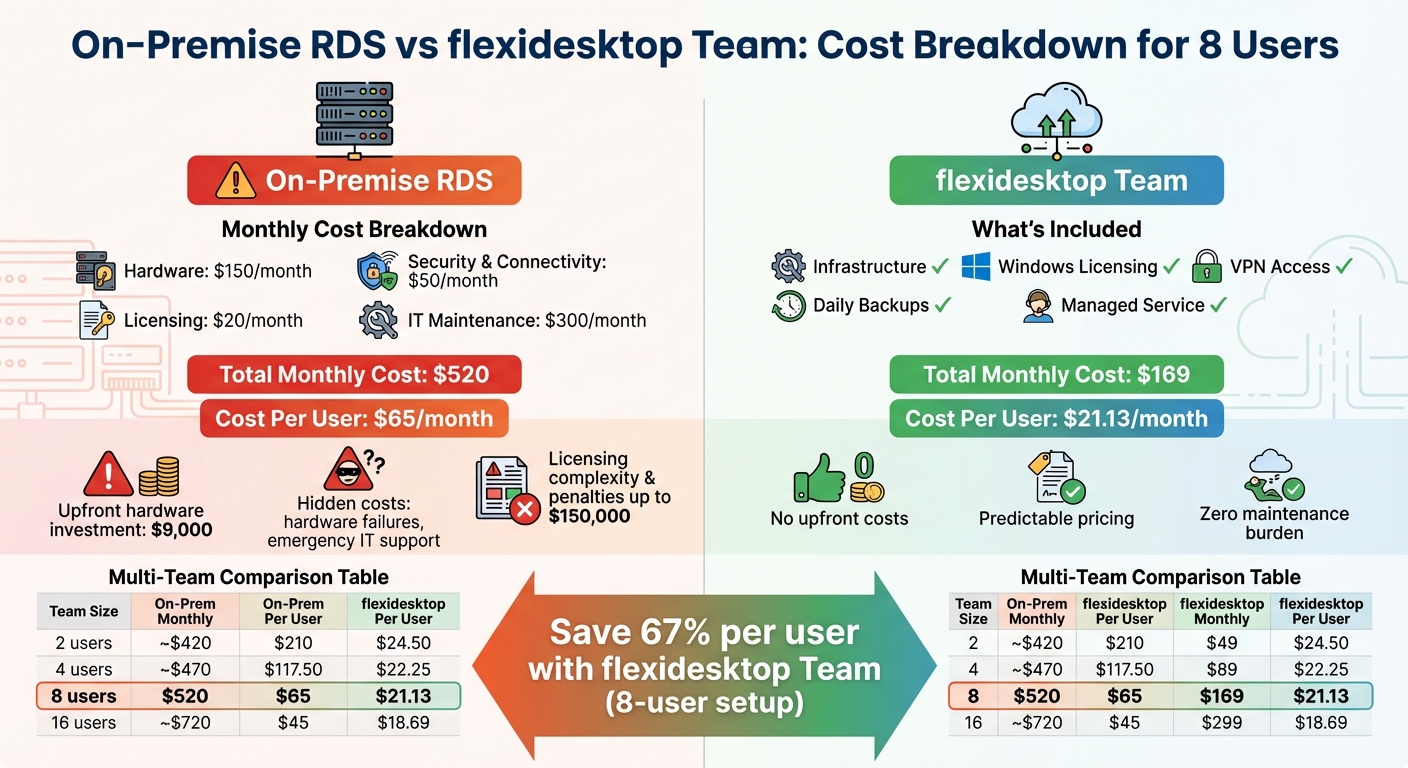
Shows the true monthly cost of running an on-prem Windows RDS server versus a managed cloud desktop, including per-user, licensing, hardware, security, and maintenance.
Hardware: A server setup, including backups and power supplies, costs around $9,000 upfront, or $150/month when spread over 5 years.
Licensing:Windows Server Standard licenses and RDS CALs for 8 users add approximately $20/month.
Security: Annual SSL certificates and VPN/firewall setups cost about $50/month.
IT Maintenance: Routine upkeep, including patching and backups, averages $300/month.
Total Monthly Cost: $520
This equals $65 per user per month for an 8-user setup.
On-Prem RDS vs flexidesktop Team — Cost Calculator
Enter your team size and assumptions to estimate your real monthly cost per user.
Adjust on-prem assumptions
On-Prem RDS
$520
per month
$65.00 / user
flexidesktop Team
$169
per month
$21.13 / user
You could save $351/mo(67%) with flexidesktop Team.
Estimates for guidance only. flexidesktop Team pricing: 2 users $49 · 4 users $89 · 8 users $169 · 16 users $299 (flat, all-inclusive).
See full pricing →
In comparison, Desktop as a Service (DaaS) solutions like flexidesktop Team offer a flat, predictable monthly fee that includes infrastructure, licensing, security, and backups. For 8 users, it costs just $169/month, or $21.13 per user – saving time, money, and stress.
If you’re managing an RDS setup, consider the hidden costs of hardware failures, licensing complexity, and ongoing maintenance. Managed services simplify IT management, letting you focus on your business instead of server upkeep.
What You Need for an On-Prem RDS Setup
What is Remote Desktop Services (RDS)?
Remote Desktop Services (RDS) is a feature built into Windows Server that allows multiple users to connect simultaneously using the Remote Desktop Protocol (RDP). Each user gets their own personalized desktop environment [3]. This setup works well for small businesses aiming to centralize their IT operations. Employees can connect to the system from home, branch locations, or even while traveling – using any device that supports RDP.
Required RDS Roles
To make RDS function properly, specific roles are necessary:
Remote Desktop Session Host: Manages user sessions.
Remote Desktop Licensing: Ensures compliance by managing the required Client Access Licenses (CALs).
Remote Desktop Gateway: Secures external connections by encapsulating RDP traffic within HTTPS.
Licensing is critical – without it, the system will stop accepting new connections after the initial grace period. For smaller setups, the gateway role can often be combined with the Session Host on a single server. Larger deployments, however, may separate these roles to boost performance.
Typical Small Business Setup
A typical small business RDS setup involves a single physical or virtual server supporting 6 to 16 users via RDP. Connections can be made either through a VPN tunnel or a Remote Desktop Gateway [5]. This server, located on-premises or in a data center, runs a version of Windows Server such as Standard or Essentials. It needs enough RAM and CPU power to handle multiple concurrent sessions smoothly.
To access the system, users install the Remote Desktop Connection client on their devices. They then enter the server’s address and log in using their Windows credentials. Once connected, the server takes over tasks like running key applications (e.g., Microsoft Office) and managing access to shared files and other business resources.
With the technical setup outlined, the next step involves breaking down the associated costs.
Full Cost Breakdown of On-Prem RDS
When it comes to running an on-premise RDS environment, the true financial commitment often extends beyond what many anticipate. The costs fall into four main categories, each with its own set of considerations. Let’s break them down.
Hardware and Virtualization Costs
Setting up a physical server for even a basic operation comes with a hefty price tag. A no-frills server without redundancy typically ranges between $3,500 and $8,000, while a more capable mid-tier server can easily exceed $10,000[6]. On top of that, small businesses usually need to invest in backup solutions (hardware and software combined) costing around $2,000, plus an uninterruptible power supply (UPS) priced at approximately $1,500[6]. Altogether, this adds up to a starting investment of roughly $9,000[6].
These hardware costs are usually spread out over a lifespan of 3 to 5 years. If you use a 5-year amortization, that $9,000 breaks down to $150 per month or $1,800 per year. However, if the server needs replacement sooner – due to failure or capacity limitations – those monthly costs will climb.
Now, let’s look at the ongoing licensing expenses.
Microsoft Licensing Costs
Licensing from Microsoft involves both recurring and upfront fees. For instance, Windows Server 2025 Standardedition (16-core license) comes with a suggested MSRP of $1,176[7]. However, the real cost driver is the Client Access Licenses (CALs). Each RDS Device CAL costs around $129.99[4].
For an 8-user setup, you’ll need 8 Windows Server CALs and 8 RDS CALs. While Windows Server Standard includes 10 CALs [1][9], the RDS CALs alone add an upfront cost of approximately $1,040. Keep in mind that these licenses are version-specific, meaning a Windows Server 2022 RDS CAL won’t work with Windows Server 2025 [1][8][9]. Failure to comply with licensing requirements can result in steep penalties, with fines starting at $100,000[1][9], making proper licensing a critical expense.
Security and Connectivity Costs
Secure remote access is another essential component. Setting up an RD Gateway requires an SSL certificate, which can cost anywhere from $50 to $200 annually, depending on the provider. Additionally, you’ll need firewall configurations and possibly a dedicated public IP address. Many businesses also opt for VPN solutions to strengthen security, which may involve hardware or software licensing costs ranging from $300 to $1,000 annually, depending on the setup.
Skipping these security measures isn’t an option. Without them, your server could be exposed to severe vulnerabilities.
Now, let’s explore the ongoing IT and maintenance expenses.
Ongoing IT and Maintenance Costs
IT labor is a major contributor to ongoing costs. Routine maintenance tasks like patching, backups, monitoring, and troubleshooting require dedicated attention [2]. Patch management alone can be labor-intensive, as each environment often needs custom solutions [2]. Remote monitoring and management (RMM) configurations also demand consistent IT involvement [2]. For businesses that require 24/7 uptime, the challenge – and cost – of maintaining RDS environments becomes even greater [2].
Assuming an IT support rate of $75 per hour and 4 hours of monthly maintenance, you’re looking at $300 per month or $3,600 per year for routine upkeep. This doesn’t include emergency support for outages, hardware failures, or major updates. Downtime can also lead to indirect costs like lost productivity, though these are more difficult to quantify.
Real Example: Cost Per User for 8 Users
Setup Assumptions
Let’s break down the estimated costs for a small business setup with 8 users:
Hardware: A mid-range server setup, including backup hardware and a UPS, comes to about $9,000. Spread over 5 years, this works out to $150 per month ($1,800 annually).
Licensing: A Windows Server Essentials edition, priced at approximately $1,200, averages $20 per month ($240 annually) over 5 years.
Security and Connectivity: An SSL certificate for the RD Gateway costs around $100 annually, and firewall/VPN setup adds another $500 annually. Together, that’s $50 per month ($600 annually).
IT Maintenance: Routine tasks like patching, monitoring, backups, and troubleshooting require about 4 hours of IT support monthly. At $75 per hour, this totals $300 per month ($3,600 annually).
Monthly Cost Calculation
Adding up these costs gives a clear picture of the total monthly expenses:
Hardware: $150
Licensing: $20
Security and Connectivity: $50
IT Maintenance: $300
Total monthly cost: $520
Divide this by 8 users, and you get a cost of $65 per user per month, which is $780 per user annually.
This calculation assumes consistent conditions over 5 years, with no unexpected hardware failures, emergency IT needs, or licensing changes. However, if the hardware were amortized over 3 years instead of 5, the monthly hardware cost would increase, raising the overall expenses and the per-user cost.
After outlining the overall expenses of setting up an on-premises RDS, let’s compare those figures to the predictable pricing model offered by flexidesktop Team.
flexidesktop Team Pricing
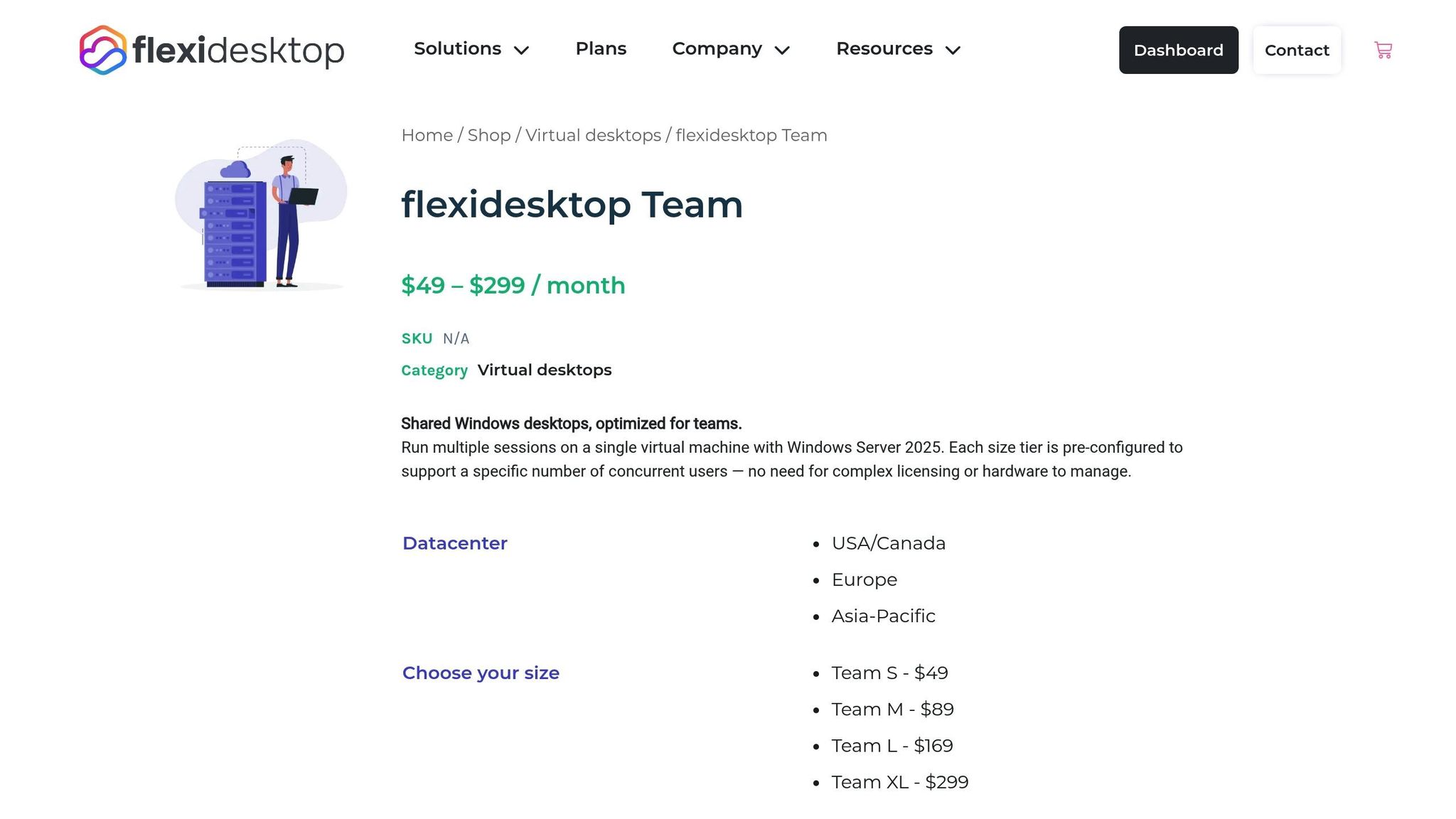
flexidesktop Team delivers a multi-user Windows environment with a flat monthly fee that covers everything: infrastructure, Windows licensing, VPN access, and daily backups. There are no upfront hardware investments, no separate CAL (Client Access License) purchases, and no hidden maintenance costs.
The pricing is refreshingly simple, with four plans tailored to team size:
Team S: Up to 2 users for $49/month
Team M: Up to 4 users for $89/month
Team L: Up to 8 users for $169/month
Team XL: Up to 16 users for $299/month
Side-by-Side Cost Comparison
Team Size
On-Prem RDS (Monthly)
On-Prem RDS (Per User)
flexidesktop Team (Monthly)
flexidesktop Team (Per User)
2 users
~$420*
$210
$49
$24.50
4 users
~$470*
$117.50
$89
$22.25
8 users
$520
$65
$169
$21.13
16 users
~$720*
$45
$299
$18.69
*These estimates include proportional hardware, licensing, and IT maintenance costs. Actual costs may vary depending on specific hardware choices and labor rates.
What the Numbers Show
For an 8-user team, an on-prem RDS setup averages $65 per user monthly, which is more than three times flexidesktop Team’s $21.13 per user. The gap widens even further for smaller teams, where fixed on-prem costs are harder to justify.
The key takeaway? On-prem RDS setups come with unpredictable costs – like surprise maintenance fees, hardware replacements, and complicated CAL management – while flexidesktop Team offers a consistent, all-inclusive monthly price. As Nannette Vilushis, Director of Marketing at GraphOn, explains:
“Microsoft RDS licensing and pricing is highly complex, and the consequences of violating Microsoft licensing policies are significant” [1].
Additionally, consider the long-term expenses of on-prem hardware. Servers typically need replacement every 3–5 years, and as they age, maintenance costs and performance issues escalate. With flexidesktop Team, hardware refresh cycles are no longer your responsibility. The provider handles everything, ensuring your monthly fee remains steady, no matter the age of the infrastructure behind the scenes.
Predictability vs Hidden Costs
Why On-Prem RDS Costs Vary
Planning a budget for on-premise RDS can feel like trying to hit a moving target. Hardware costs alone can throw things off – unexpected failures might set you back anywhere from $10,000 to $30,000 for replacements. Then, there are the monthly fluctuations in electricity and cooling costs, which can make expenses even harder to pin down [2][10].
Licensing adds another layer of unpredictability. Microsoft RDS CAL pricing varies widely; for instance, a five-pack of Windows Server 2022 RDS user CALs can range from $480 to $1,000 [1][11]. On top of that, new versions of Windows Server often demand new RDS CALs, creating unplanned costs [1]. Miscalculating your license needs can be even more costly. Microsoft penalties may include paying 125% of the list price for volume licenses, an extra 5% for unlicensed products, and fines as high as $150,000 per infringement [1].
And while routine patching might take just a few hours a month, a security breach or system failure can consume days of your IT team’s time [10][2]. As Nerdio points out:
“Licensing compliance is a minefield! Get it wrong, and Microsoft can hit your company with tens of thousands in fines” [2].
This level of cost unpredictability stands in stark contrast to the stability offered by managed solutions.
Fixed Monthly Pricing with flexidesktop Team
Here’s where flexidesktop Team changes the game. With flat monthly pricing, you can say goodbye to surprise expenses. This pricing includes everything – your infrastructure, Windows licensing, VPN access, and even daily backups. No upfront capital costs. No unexpected hardware failures. No stressful licensing audits. For example, if your monthly rate is $169 for 8 users, it stays at $169 – month after month.
By shifting from unpredictable capital expenditures to consistent operational expenses, this model makes life much easier for finance teams. Budgeting becomes simple and straightforward.
Managed Service vs Self-Managed Infrastructure
With all the unpredictability of on-prem RDS, it’s no wonder so many businesses prefer a fully managed service model. Managing an on-prem RDS setup means your IT team has to handle everything: connection brokers, gateways, patching, security updates, backups, and even hardware monitoring [2]. This not only demands a lot of time but also requires specialized expertise – something that can be a significant burden for smaller businesses.
flexidesktop Team’s managed service takes all of that off your plate. Your team gets secure RDP access through a preconfigured VPN, while the backend infrastructure is fully managed for you. No more server maintenance, troubleshooting gateway issues, or worrying about Windows Server security patches. It’s all handled behind the scenes, letting your team focus on what they do best.
Conclusion
Setting up on-premise RDS can end up being far more expensive than it seems at first glance. Costs quickly escalate due to hardware investments, Microsoft licensing fees, ongoing maintenance, and unforeseen expenses. Even a simple mistake in licensing choices can increase expenses by 30–50% [12]. Nannette Vilushis, Director of Marketing at GraphOn, highlights this complexity:
“Microsoft RDS licensing and pricing is highly complex, and the consequences of violating Microsoft licensing policies are significant” [1].
Beyond licensing, additional challenges like hardware failures and compliance penalties can pile on even more costs.
That’s where flexidesktop Team offers a refreshing alternative. With flat monthly pricing, their solution includes infrastructure, Windows licensing, VPN access, and daily backups – all managed for you. For example, an 8-user team pays just $169 per month, with no upfront costs, no hardware headaches, and no licensing audits. It’s a straightforward, predictable option that removes the stress of managing IT infrastructure.
Ultimately, small businesses face a choice: wrestle with the complexities of server management, licensing, and troubleshooting, or focus on running and growing their business. With flexidesktop Team, you can leave the IT worries behind and dedicate your time to what truly matters.
Ready to simplify your IT and cut unpredictable costs? Visit flexidesktop Team to explore their fully managed solution.
FAQs
What unexpected costs should I consider when running an on-premises RDS server?
Running an on-premises RDS server comes with a range of often-overlooked expenses that go beyond just licensing fees. For starters, there are hardware costs, which include buying or maintaining servers, storage systems, and virtualization infrastructure. These investments are typically spread out over 3 to 5 years but can still weigh heavily on your budget.
Then there are security and connectivity expenses, such as setting up an RD Gateway, obtaining SSL certificates, configuring firewalls, and securing public IP addresses. These are crucial for protecting your system but add to the overall cost.
You also need to factor in operational costs, which can quickly pile up. IT staff time spent on updates, backups, monitoring, and managing any downtime is both time-consuming and expensive. And don’t forget about licensing fees, which include Windows Server, RDS CALs (whether per user or per device), and any additional features needed for security or compliance. When you add all this up, the total cost of ownership often ends up being much higher than you might initially expect.
How does licensing complexity affect the cost of running an RDS server?
Licensing can quickly become a major expense when running an RDS server, piling on costs and administrative headaches. To get started, you’ll need a combination of licenses: Windows Server licenses, RDS CALs (Client Access Licenses) for every user or device, and possibly Software Assurance fees. The exact costs depend on the size of your deployment and your specific licensing agreements, which can make it tough to predict and manage your budget.
If licensing is mismanaged or doesn’t meet compliance requirements, you could face penalties – adding even more to your expenses. For virtualized environments, things get even trickier. You’ll need to carefully consider mobility rights, which can make planning and budgeting even more complex. In the end, the intricate licensing requirements not only increase the total cost of ownership but also add a significant administrative burden, especially for smaller businesses.
Why is a managed service often more cost-effective than running an on-premises RDS server?
Managed services can be a smarter financial choice because they cut out the hefty upfront costs of hardware, ongoing maintenance, and the need for a full-time IT team. Instead, you get a subscription-based model with predictable pricing that adjusts to your needs, helping you avoid overspending on unused resources or falling short when demand spikes.
On top of that, managed services take care of tasks like resource management, security updates, and backups automatically. This not only saves time but also trims down operational headaches. On the flip side, traditional on-premises setups come with large capital expenses, require hands-on management, and often bring hidden costs – like surprise hardware failures or unplanned downtime – that can add up over time.
Israel de la Torre is the founder of flexidesktop and has spent 15+ years working in cloud infrastructure and Windows virtualization. He helps businesses migrate from on-premises Windows setups to managed cloud desktops.
Compare remote-access apps and cloud desktops to choose the right RDP alternative—use remote tools for occasional access or cloud PCs for always-on team work.
To provide the best experiences, we use technologies like cookies to store and/or access device information. Consenting to these technologies will allow us to process data such as browsing behavior or unique IDs on this site. Not consenting or withdrawing consent, may adversely affect certain features and functions.
Functional
Always active
The technical storage or access is strictly necessary for the legitimate purpose of enabling the use of a specific service explicitly requested by the subscriber or user, or for the sole purpose of carrying out the transmission of a communication over an electronic communications network.
Preferences
The technical storage or access is necessary for the legitimate purpose of storing preferences that are not requested by the subscriber or user.
Statistics
The technical storage or access that is used exclusively for statistical purposes.The technical storage or access that is used exclusively for anonymous statistical purposes. Without a subpoena, voluntary compliance on the part of your Internet Service Provider, or additional records from a third party, information stored or retrieved for this purpose alone cannot usually be used to identify you.
Marketing
The technical storage or access is required to create user profiles to send advertising, or to track the user on a website or across several websites for similar marketing purposes.
To provide the best experiences, we use technologies like cookies to store and/or access device information. Consenting to these technologies will allow us to process data such as browsing behavior or unique IDs on this site. Not consenting or withdrawing consent, may adversely affect certain features and functions.
Functional
Always active
The technical storage or access is strictly necessary for the legitimate purpose of enabling the use of a specific service explicitly requested by the subscriber or user, or for the sole purpose of carrying out the transmission of a communication over an electronic communications network.
Preferences
The technical storage or access is necessary for the legitimate purpose of storing preferences that are not requested by the subscriber or user.
Statistics
The technical storage or access that is used exclusively for statistical purposes.The technical storage or access that is used exclusively for anonymous statistical purposes. Without a subpoena, voluntary compliance on the part of your Internet Service Provider, or additional records from a third party, information stored or retrieved for this purpose alone cannot usually be used to identify you.
Marketing
The technical storage or access is required to create user profiles to send advertising, or to track the user on a website or across several websites for similar marketing purposes.