Compare costs, deployment, security, and the best hosted Windows desktop options for small businesses.
Looking for an IT solution that simplifies management, cuts costs, and supports remote work? Hosted Windows desktops might be the answer. These cloud-based systems let you access a secure, centralized Windows environment from any device – without the headaches of managing hardware or complex IT setups.
Here’s the breakdown:
Traditional PCs: High upfront hardware costs ($800–$1,500 per user), slow to scale, and risky for data security.
Self-Managed Cloud VMs: Flexible but require technical expertise and come with unpredictable monthly costs.
Enterprise VDI: Designed for large organizations, often too complex and costly for small businesses.
For small teams, managed hosted desktops provide a simple, cost-effective solution. You get all the benefits of a virtual desktop without the hassle of managing infrastructure or licenses. Keep reading for a detailed comparison of the options to find the best fit for your business.
Hosted Windows Desktop Solutions Comparison for Small Business
1. Traditional PCs
For years, small businesses have depended on physical desktops and laptops as their go-to computing solution. The process is straightforward: purchase the hardware, install the software, and assign machines to employees. While familiar, this approach reveals its downsides as businesses expand or transition to remote work.
Pricing
Business-grade computers typically cost between $800 and $1,500 per employee, not including individual software licenses for Windows, Microsoft Office, or industry-specific tools. Unlike cloud-based solutions with predictable monthly fees, these costs hit your budget in one lump sum.
Then come the ongoing expenses: repairs, hardware replacements every 3–5 years, and IT support for updates and troubleshooting. These costs can be unpredictable – think failed hard drives or motherboards – and can lead to emergency spending and downtime. To make matters worse, many small businesses skip daily backups, putting critical data at risk of loss.
Deployment Complexity
Onboarding new employees with traditional PCs can be a logistical headache. Each hire requires ordering, shipping, and configuring hardware with the operating system, security updates, and necessary software. This process can take days or even weeks, delaying productivity for new team members or contractors.
Scalability
Scaling with traditional PCs isn’t seamless. Hiring new staff means purchasing more hardware, waiting for delivery, and dealing with setup delays. Conversely, when downsizing, businesses are left with costly equipment that often has little resale value. This lack of flexibility makes it hard to adjust resources to meet changing business needs.
Security and Data Management
Storing data locally increases the risk of failure and security issues. If a laptop is lost, stolen, or damaged, vital business information could disappear permanently. Remote access solutions, like VPNs or remote desktop setups, add complexity and can introduce security vulnerabilities. For high-risk tasks, some organizations use isolated virtual desktops to keep sensitive operations separate from the main network.
Without centralized oversight, maintaining consistent security standards is nearly impossible. Employees may have outdated antivirus software, inconsistent patch levels, or unauthorized apps installed – creating potential weak points for cyberattacks. These challenges are prompting many businesses to explore more secure, flexible, and cost-efficient options like managed hosted desktop solutions.
sbb-itb-bea6502
2. Self-Managed Cloud VMs
Some small businesses are moving away from physical hardware and opting for cloud VMs on platforms like AWS, Azure, or Google Cloud. This shift eliminates the hassle of maintaining physical machines, but it transfers the responsibility of managing your own cloud infrastructure. Tasks like configuring Windows Server, managing licenses, setting up remote access, and ensuring security become part of your daily operations – essentially creating your own IT department in the cloud.
Pricing
At first glance, self-managed cloud VMs seem like a budget-friendly option. But the reality is that costs can quickly get complicated. Charges for compute power, storage, and bandwidth fluctuate monthly, depending on how much your team uses [2]. Unlike managed services with predictable flat rates, your bill can unexpectedly increase if your usage spikes.
On top of these variable costs, you’ll need separate licenses for Windows Server, Terminal Services, and Client Access Licenses (CALs) [2]. These add extra expense and require careful compliance tracking. Optional features like Dedicated Domain Controllers and high-speed NVMe SSD storage can further inflate your monthly costs [1]. Don’t forget the labor costs for IT tasks like updates, troubleshooting, and maintenance. All of this creates a pricing model that can be hard to predict and manage.
Deployment Complexity
Setting up self-managed cloud VMs is no small task, especially for small businesses without in-house IT expertise. You’ll need to configure the operating system, install and license software, create user accounts, enable secure remote access (usually through VPNs like OpenVPN, WireGuard, or IPsec), and ensure integration with your existing systems [2]. Migrating your applications to the new environment can also be a complex process, depending on their specific requirements [4]. While managed desktops can onboard new users in less than five minutes [2], self-managed setups often take much longer unless you have advanced automation tools in place.
Scalability
Cloud VMs do offer more flexibility than physical hardware, but scaling up isn’t as straightforward as with managed solutions. Each new user requires manual configuration [1]. This means you’ll need IT resources to handle these changes, and any missteps in allocating resources could lead to performance issues or unexpected costs. Managed solutions, on the other hand, allow you to add or remove users instantly with pre-configured options [3], eliminating the need for hands-on adjustments with every change.
Security and Data Management
With self-managed VMs, you get full administrator access and total control over your security settings [2]. While this level of control might sound appealing, it comes with a heavy dose of responsibility. You’ll need to stay on top of patch management, antivirus updates, firewall configurations, backup schedules, and compliance with regulations like PCI-DSS, GDPR, or HIPAA. Without a dedicated IT team, maintaining these security standards across multiple VMs can quickly become overwhelming.
Advanced security measures like file integrity monitoring, vulnerability scans, or preventing data exfiltration (e.g., disabling copy/paste or blocking file-sharing tools) require technical expertise and constant attention [2]. This high level of control often translates into ongoing management headaches, which is why many small businesses prefer managed hosted desktop solutions.
Next, we’ll take a closer look at how enterprise VDI compares to this approach, highlighting why self-managed VMs might not be the best fit for small business needs.
3. Enterprise VDI
Enterprise VDI platforms like Azure Virtual Desktop (AVD), Citrix DaaS, and VMware Horizon Cloud are designed with larger organizations in mind. While they offer robust control and scalability, the complexity of these systems can overwhelm small business IT teams, making them less practical for smaller operations.
Pricing
Pricing for enterprise VDI solutions can be anything but simple, especially when performing a PC vs VDI cost comparison. For example, Azure Virtual Desktop offers a free control plane for users with eligible Microsoft 365 licenses (such as E3, E5, or Business Premium). However, you’ll still need to cover the costs of the infrastructure. Session hosts can run around $38 per user per month on-demand or $26 per user per month with a three-year reservation [5].
Citrix DaaS licenses typically range from $10 to $16 per user per month, but this does not include the costs for cloud virtual machines and storage [5]. If you’re considering dedicated AVD solutions from third-party providers, costs can start at $90 per month for one user (Bronze tier) and go up to $525 per month for 15 users (Platinum tier) [4]. Additionally, using Azure Reserved Instances can lower steady-state infrastructure costs by up to 72% [5]. That said, as your team grows or usage increases, expect costs to rise accordingly.
Deployment Complexity
Setting up enterprise VDI is no small task. It involves configuring virtual machines, managing storage for operating system images and user profiles, and fine-tuning network settings. Tools like automation scripts, desktop image management, and monitoring platforms add to the operational workload. For instance, Azure Virtual Desktop can be particularly intricate when dealing with licensing, security, and user permissions. Similarly, Citrix DaaS and VMware Horizon Cloud require advanced IT skills for proper configuration.
For businesses without a dedicated IT team, this level of complexity can feel overwhelming. In contrast, managed desktop solutions simplify the process, offering a more user-friendly approach to setup and ongoing management.
Scalability
Enterprise VDI platforms excel at scaling up quickly, allowing organizations to deploy new virtual desktops as needed. However, each additional user requires careful configuration and resource allocation. Businesses with fewer than 200 users often struggle to achieve the same efficiency as larger-scale deployments. On the other hand, organizations with more than 2,000 users may find it more cost-effective to shift workloads to private clusters rather than relying entirely on public cloud resources [5]. For small businesses, this often results in paying for more infrastructure than they actually need.
Security and Data Management
One of the strengths of enterprise VDI is its ability to centralize data in the cloud, reducing risks associated with hardware loss or theft [4][3]. Security features like encryption, daily backups, and centralized firewall management add an extra layer of protection [4][3]. However, these features don’t manage themselves – they require active oversight and configuration. Without a skilled IT team, even the most advanced security measures can become a weak point.
Managed hosted desktops offer a simpler alternative, addressing these challenges with easier administration while retaining the core security benefits.
Next, we’ll dive into managed hosted desktops and how they simplify these complexities while maintaining key advantages.
Managed hosted desktops make IT simpler by offering a virtual desktops that you can access from virtually any device. Unlike traditional setups, you don’t need to deal with configuring virtual machines or managing complex systems. This makes them a great choice for small businesses looking for a secure, easy-to-manage, and budget-friendly desktop solution – qualities that flexidesktop exemplifies.
Pricing
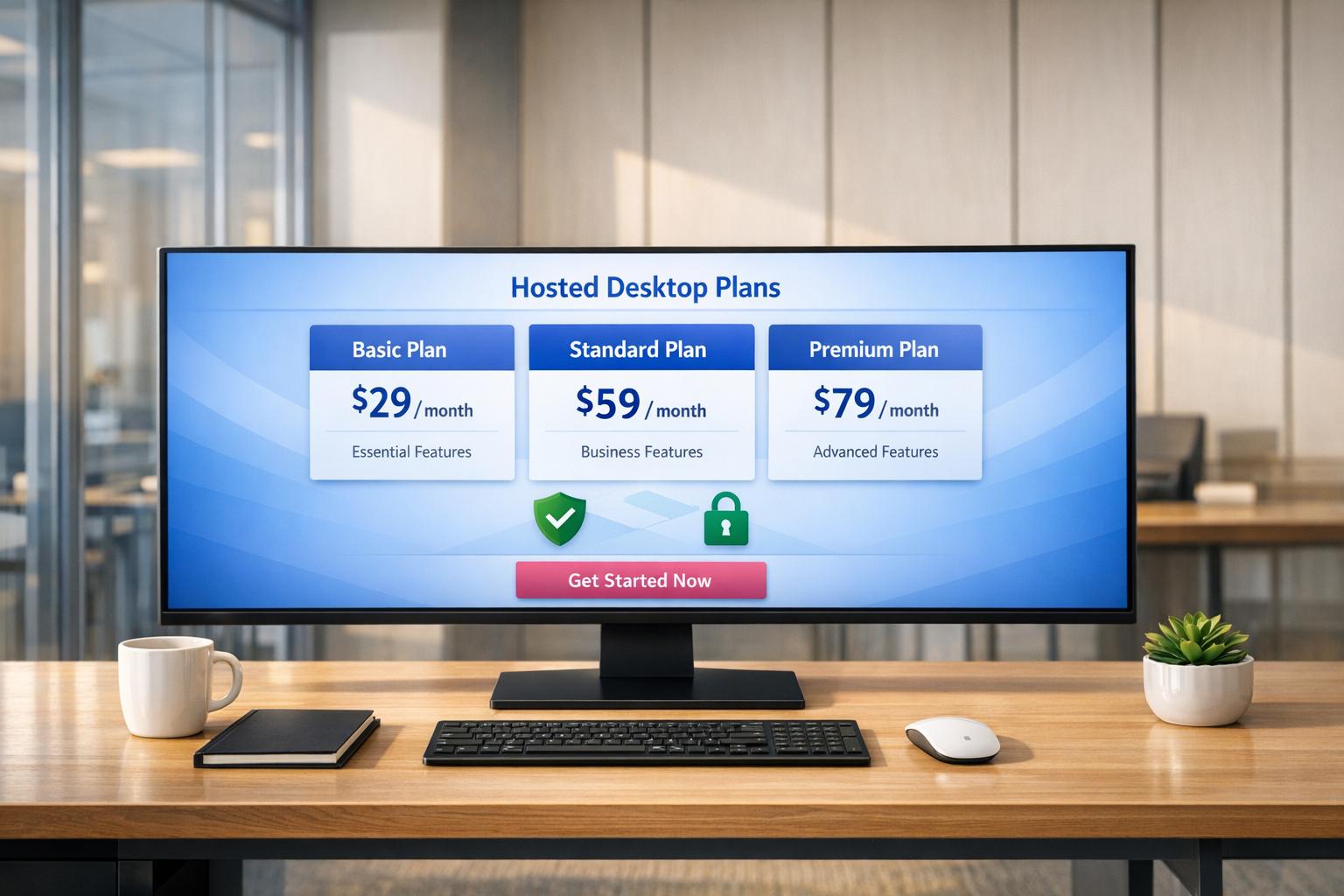
Managed hosted desktops typically follow a clear monthly pricing model, avoiding hidden charges for things like bandwidth, support, or licensing. For instance, flexidesktop offers plans starting at $19 per month for an XS instance (1 vCPU, 2 GB RAM, 40 GB SSD) and going up to $109 per month for an XL instance (8 vCPU, 24 GB RAM, 120 GB SSD). If you need a shared environment for multiple users, Team plans start at $49 per month for up to 2 users and scale up to $299 per month for up to 16 users on Windows Server 2025.
These plans bundle everything – compute, storage, licensing, and bandwidth – into one predictable monthly fee. This includes Terminal Services (TS) licensing and Client Access Licenses (CALs), which can be costly and time-consuming to manage on your own.
Deployment Complexity
Setting up a managed hosted desktop is fast and straightforward. Instead of spending days or weeks configuring virtual machines, handling storage, or fixing network issues, you can be up and running in minutes. Providers take care of OS updates, security patches, and infrastructure maintenance automatically. As flexidesktop describes it:
“No unnecessary complexity, no guesswork on performance, and no confusing pricing – just a reliable setup you can actually manage day to day.” [6]
Users can log in through a web browser or remote desktop client from almost any device – Macs, iPads, Android tablets, or even older PCs. This extends the life of your existing hardware and eliminates the need for setting up a VPN. If you’re transitioning from physical desktops, many providers offer expert migration assistance to make the process seamless. The setup is designed to scale easily while maintaining strong security measures.
Scalability
Scaling up or down is effortless. Adding a new user or provisioning a desktop takes less than 5 minutes, making it perfect for onboarding remote employees or contractors without waiting for hardware shipments or manual configurations. You can upgrade your plan during your subscription as your workloads change, with each plan offering fixed RAM and vCPU allocations. This flexibility helps avoid overcommitting to hardware and eliminates delays during growth phases.
For small businesses, this approach avoids the inefficiencies of traditional enterprise VDI systems, which often struggle to balance cost and performance for smaller teams. Managed desktops work efficiently whether you need one desktop or dozens.
Security and Data Management
Managed hosted desktops prioritize security by centralizing data in the cloud. Features like encryption, automated backups, and continuous threat monitoring protect against data loss from hardware theft or failure. Built-in compliance measures for regulations like GDPR, HIPAA, and PCI-DSS ensure your business meets necessary standards [6].
flexidesktop reported a 99.98% uptime across its infrastructure in 2025 [6], showing how reliable these systems are. Providers handle routine security tasks like patching and baseline protection, while optional features like dedicated domain controllers offer advanced identity management for businesses needing tighter access controls.
Feature
Physical Desktops
Managed Hosted Desktops (flexidesktop)
Initial Costs
High (Hardware + Licenses)
Low (Subscription-based)
Scalability
Slow (Requires buying/shipping hardware)
Instant (Add/remove users in minutes)
Maintenance
Manual updates and hardware repairs
Managed by provider; no hardware to fix
Data Security
Local storage (High risk of loss/theft)
Centralized cloud storage with encryption and included backups, with retention periods based on your plan
Remote Access
Limited/Requires VPN setup
Native access from any device via browser, with optional Remote Desktop Protocol (RDP) access
Licensing
Managed by user
Handled by us (TS/CALs included)
Pros and Cons Summary
Here’s a breakdown of the key advantages and tradeoffs for each deployment model discussed earlier:
Traditional PCs come with high upfront costs for hardware and demand ongoing IT support. However, they provide full control over physical infrastructure, making them suitable for businesses with dedicated IT teams.
Self-managed cloud VMs offer scalability and flexibility, but they require significant technical expertise to handle licensing, security, and infrastructure. This often leads to unpredictable monthly expenses, which can be a challenge for smaller teams.
Enterprise VDI solutions shine in centralized management and security but are generally excessive for smaller organizations. Their complex architecture requires specialized staff and involves steep infrastructure and licensing costs. For instance, a 100-user deployment can cost over $100 per user per month, making them more practical for large enterprises managing hundreds of users.
Managed hosted desktops strike a practical balance for small businesses. They remove the hassle of hardware procurement and IT management while providing predictable, all-inclusive monthly pricing. Costs typically range from $19 to $174 per month for single users or $49 to $299 per month for team setups. These solutions simplify licensing and infrastructure management, freeing up internal resources. Provisioning is quick, often taking less than 5 minutes.
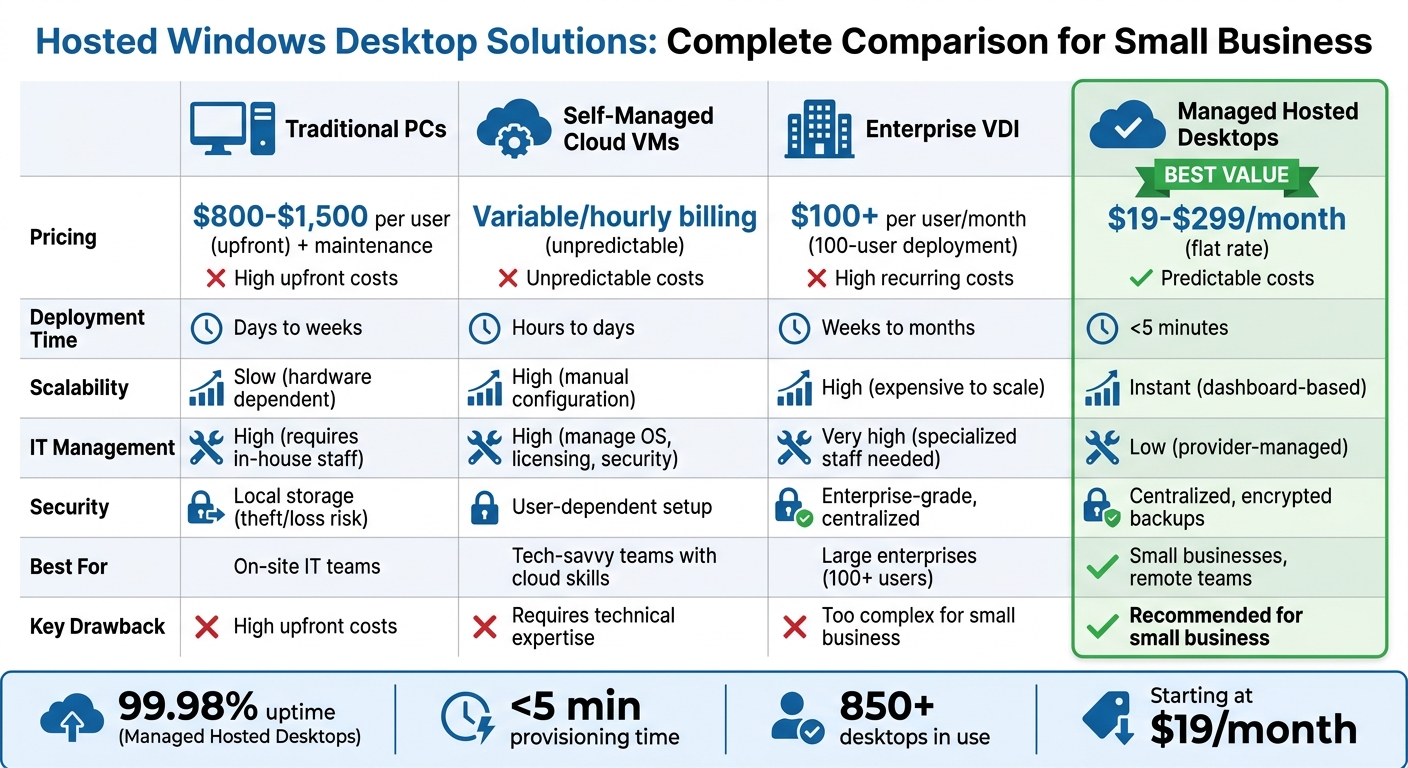
To make this comparison easier, here’s a table summarizing the main differences:
Feature
Traditional PCs
Self-Managed Cloud VMs
Enterprise VDI
Managed Hosted Desktops
Pricing Model
High upfront CapEx + maintenance
Variable (often hourly billing)
High infrastructure + licensing
Flat monthly rate ($19–$299)
Deployment Time
Days to weeks (hardware setup)
Hours to days (requires setup)
Weeks to months (complex setup)
Minutes (<5 min provisioning)
Scalability
Slow (buy and ship hardware)
High (manual configuration needed)
High (expensive to scale)
Instant (add users via dashboard)
IT Management
Requires in-house staff
High (manage OS, licensing, etc.)
Very high (specialized staff)
Low (provider handles backend)
Security & Data
Local storage (risk of theft)
User-dependent security setup
Centralized (enterprise-grade)
Centralized, encrypted backups
Best For
On-site IT teams
Tech-savvy teams with cloud skills
Large enterprises (100+ users)
Small businesses, remote teams
Your decision should align with your team’s technical skills, budget preferences, and scaling needs. For small businesses looking for simplicity, security, and predictable costs, managed hosted desktops are often the most practical option.
Conclusion
For small businesses, flexidesktop’s managed hosted desktops offer a practical mix of cost control, quick setup, and built-in security. Unlike traditional PCs that require hefty upfront investments or self-managed cloud VMs that demand technical know-how and come with unpredictable bills, managed desktops simplify the process. They remove the hassle of administration while delivering enterprise-grade features without the complexity.
With flat monthly pricing ranging from $19 to $299 per user, flexidesktop covers everything – operating system licenses, security updates, automated backups, and technical support – without hidden fees or unexpected infrastructure costs. Need a new desktop? You can set one up in under 5 minutes and scale your team effortlessly using a straightforward dashboard. Forget hardware delays or complicated virtual desktop setups. Plus, with 99.98% uptime through 2025 and over 850 desktops already in use, the platform ensures dependable performance without unnecessary overhead.
This solution tackles key challenges for distributed teams: no more hardware replacement cycles, easier onboarding for remote staff, enhanced data security via centralized encrypted storage, and predictable monthly costs instead of large upfront expenses. It also provides full Administrator access, so you can install custom software while leaving infrastructure management to the experts.
FAQs
How do I choose the right desktop size (XS–XL) for my apps?
Selecting the right desktop size depends on your app’s resource demands and the intensity of your workload. Here’s a quick breakdown:
XS or S: Ideal for lightweight tasks like web browsing or running basic applications.
M or L: A better choice for multitasking or handling data-intensive operations.
XL: Designed for high-performance activities, such as 3D modeling or other resource-heavy tasks.
A good approach is to start small and adjust as needed. This lets you strike a balance between performance and cost, especially with flexible resizing options available.
Are backups included with hosted desktops?
Yes, backups are included, with retention periods depending on the selected plan. This helps protect business data while keeping backup management simple and predictable.
How hard is it to migrate our data and apps to a hosted desktop?
Migrating your data and applications to a hosted desktop with flexidesktop is a simple, supported process. Your data and apps are securely transferred to the virtual environment with minimal disruption to your workflow. flexidesktop offers dedicated guidance and assistance to ensure everything goes smoothly. This makes it easier for small businesses to onboard remote employees, support contractors, and shift workloads efficiently – all while cutting down on the usual administrative hassle.
Israel de la Torre is the founder of flexidesktop and has spent 15+ years working in cloud infrastructure and Windows virtualization. He helps businesses migrate from on-premises Windows setups to managed cloud desktops.
Compare remote-access apps and cloud desktops to choose the right RDP alternative—use remote tools for occasional access or cloud PCs for always-on team work.
To provide the best experiences, we use technologies like cookies to store and/or access device information. Consenting to these technologies will allow us to process data such as browsing behavior or unique IDs on this site. Not consenting or withdrawing consent, may adversely affect certain features and functions.
Functional
Always active
The technical storage or access is strictly necessary for the legitimate purpose of enabling the use of a specific service explicitly requested by the subscriber or user, or for the sole purpose of carrying out the transmission of a communication over an electronic communications network.
Preferences
The technical storage or access is necessary for the legitimate purpose of storing preferences that are not requested by the subscriber or user.
Statistics
The technical storage or access that is used exclusively for statistical purposes.The technical storage or access that is used exclusively for anonymous statistical purposes. Without a subpoena, voluntary compliance on the part of your Internet Service Provider, or additional records from a third party, information stored or retrieved for this purpose alone cannot usually be used to identify you.
Marketing
The technical storage or access is required to create user profiles to send advertising, or to track the user on a website or across several websites for similar marketing purposes.
To provide the best experiences, we use technologies like cookies to store and/or access device information. Consenting to these technologies will allow us to process data such as browsing behavior or unique IDs on this site. Not consenting or withdrawing consent, may adversely affect certain features and functions.
Functional
Always active
The technical storage or access is strictly necessary for the legitimate purpose of enabling the use of a specific service explicitly requested by the subscriber or user, or for the sole purpose of carrying out the transmission of a communication over an electronic communications network.
Preferences
The technical storage or access is necessary for the legitimate purpose of storing preferences that are not requested by the subscriber or user.
Statistics
The technical storage or access that is used exclusively for statistical purposes.The technical storage or access that is used exclusively for anonymous statistical purposes. Without a subpoena, voluntary compliance on the part of your Internet Service Provider, or additional records from a third party, information stored or retrieved for this purpose alone cannot usually be used to identify you.
Marketing
The technical storage or access is required to create user profiles to send advertising, or to track the user on a website or across several websites for similar marketing purposes.


 Managed hosted desktops make IT simpler by offering a