DaaS vs VDI vs RDS: Which Solution Is Right for Your Company in 2026?

Picture of Israel de la Torre
Israel de la Torre
DaaS vs VDI vs RDS: Which Solution Is Right for Your Company in 2026?
Choose DaaS for agility, VDI for control, and RDS for cost-efficiency—pick based on security, scale, and IT resources.

Struggling to choose between DaaS, VDI, and RDS for your business? Here’s the breakdown:

  • DaaS (Desktop as a Service): Fully cloud-based, subscription-based model. Quick to deploy, minimal IT involvement, and scales instantly. Costs range from $25–$300 per user/month depending on requirements.
  • VDI (Virtual Desktop Infrastructure): On-premises or private cloud. High upfront costs but offers full control over security and compliance. Best for industries with strict data regulations.
  • RDS (Remote Desktop Services): Shared session-based model. Cost-effective and efficient for standardized tasks. Supports 50–100 users per server but limited customization.

Quick Comparison:

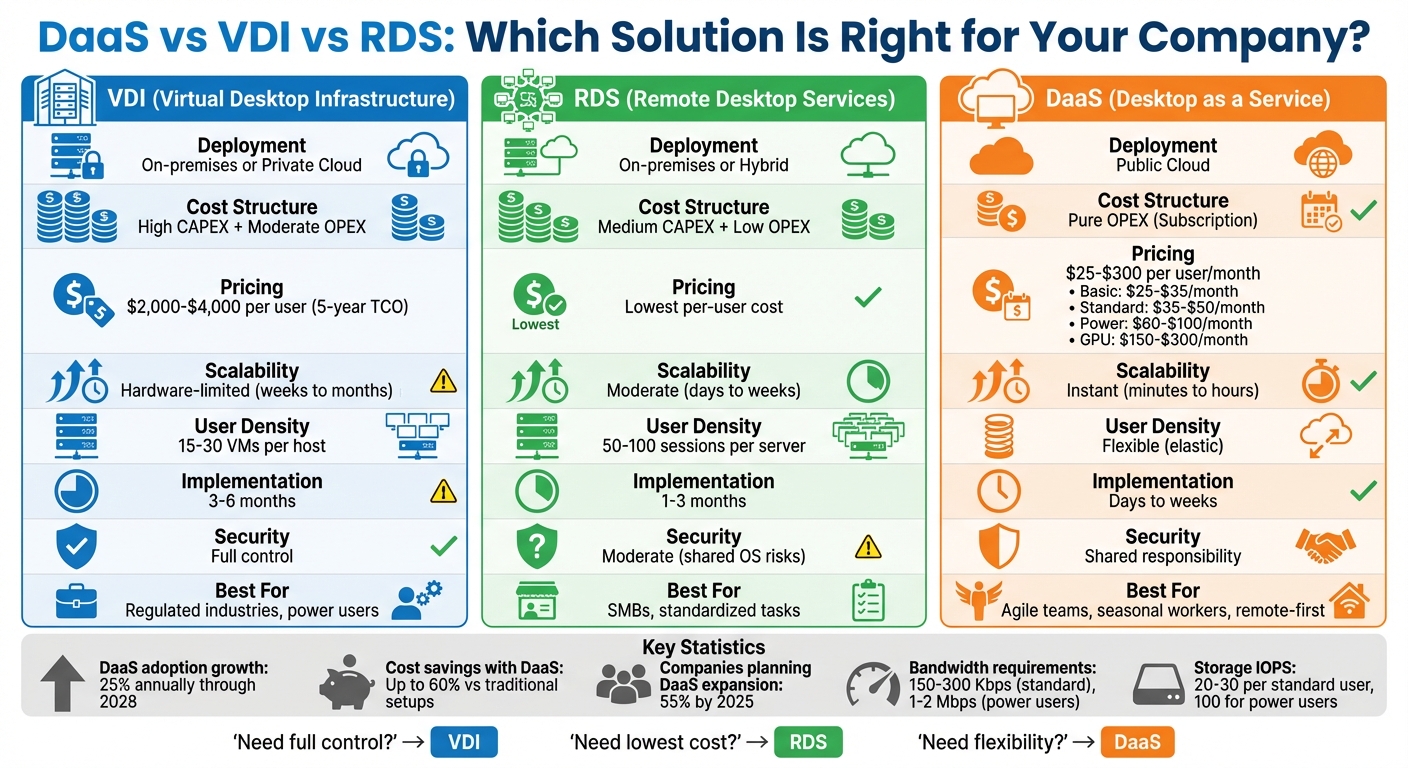
Criteria DaaS VDI RDS
Cost Subscription (OPEX) High upfront (CAPEX) + maintenance Medium upfront (CAPEX), low ongoing
Scalability Instant Hardware-limited Moderate (add servers as needed)
Security Shared responsibility Full control Moderate (shared OS risks)
Best For Agile teams, seasonal workers Regulated industries, power users SMBs, standardized tasks

Each option has its strengths – DaaS for flexibility, VDI for control, and RDS for cost efficiency. Your choice depends on your IT resources, budget, and user needs.

DaaS vs VDI vs RDS Comparison Chart: Cost, Scalability, and Security

DaaS vs VDI vs RDS Comparison Chart: Cost, Scalability, and Security

AVD Multi-Session, Single Session or W365 Cloud PC? What’s Best in 2025?”

What Are DaaS, VDI, and RDS?

Before diving into comparisons, let’s break down what these three solutions actually do. While all deliver remote desktops, they differ in how they’re managed, where they’re hosted, and how resources are allocated. Here’s a closer look at each model’s setup, performance, and cost structure.

Desktop as a Service (DaaS)

DaaS is a cloud-based subscription model where a third-party provider delivers virtual desktops and applications over the internet. You pay a monthly fee per user, and the provider handles all the infrastructure – servers, storage, networking, and virtualization software.

This setup means your IT team doesn’t have to worry about hardware, data center space, or capacity planning. Users can access their personalized desktops from virtually any device – whether it’s a laptop, tablet, or thin client – using secure protocols like RDP or PCoIP.

"DaaS provides VDI functionality without the infrastructure ownership, management overhead, or capital investment, transforming desktop delivery into an operational expense." – Pure Storage [1]

Modern DaaS platforms, as of 2026, leverage global edge networks and CDNs to minimize latency for users spread across different locations. They also use AI to dynamically allocate resources, ensuring consistent performance even during peak demand [1].

When it comes to pricing, DaaS is simple:

  • Basic desktops (2 vCPU, 4GB RAM): $25–$35 per user/month
  • Standard desktops (2 vCPU, 8GB RAM): $35–$50 per user/month
  • Power users (4 vCPU, 16GB RAM): $60–$100 per user/month
  • GPU-supported desktops: $150–$300 per user/month
    Storage costs range from $0.10 to $0.30 per GB [1].

Organizations have reported up to 60% cost savings with DaaS compared to traditional setups. It’s no surprise that about 55% of companies expressed interest in expanding DaaS adoption by 2025. The market is booming, with IDC projecting a 25% annual growth in DaaS adoption through 2028 [1][4].

Virtual Desktop Infrastructure (VDI)

VDI shifts the responsibility for management and infrastructure back to your team. It’s an on-premises or private cloud solution where each user gets their own virtual machine (VM) with dedicated resources and an individual operating system.

VDI operates on a 1:1 model, meaning every user has their own VM. This setup allows for a desktop experience that’s as close as possible to using a physical workstation. You can choose between persistent desktops (where user settings and data are saved) or non-persistent desktops (which reset after each session).

Managing VDI means overseeing everything from the hypervisor to the connection broker and display protocols. Deployments can take anywhere from 3 to 6 months, as they involve hardware procurement, data center setup, and software configurations [1].

You’ll need significant hardware to support a large user base, with typical setups running 15–30 VMs per host server. Costs are heavily front-loaded, with capital expenditures (CAPEX) for servers, storage, networking, and licenses. Over five years, the total cost of ownership (TCO) for standard desktops ranges from $2,000 to $4,000 per user [1].

VDI is ideal for organizations that need strict control over data or must meet regulatory compliance standards like HIPAA or PCI-DSS. Industries like healthcare and financial services often lean toward VDI for these reasons.

Remote Desktop Services (RDS)

RDS takes a different approach by using session-based access to maximize resource sharing. Built into Windows Server, RDS allows multiple users to share the resources of a single server instance, with each user running an isolated session.

RDS follows a "Many:1" model, where 50–100 users can share a single server’s resources via the Remote Desktop Session Host (RDSH) [1]. All users operate on the same underlying OS and hardware, which keeps hardware requirements and per-user costs low.

By default, RDS environments are non-persistent, meaning user settings and data aren’t saved unless you use external profile management tools. This makes it a great fit for standardized workflows where users don’t need administrative privileges or custom software.

Implementation is faster than VDI, typically taking 1 to 3 months [1]. Costs include medium CAPEX for servers and RDS Client Access Licenses (CALs) for each user. The RD Gateway adds secure external access over HTTPS, eliminating the need for traditional VPNs [3].

RDS is the most cost-effective option for teams that prioritize standardization and efficiency over customization. If your workforce relies on a uniform set of applications, RDS delivers the lowest per-user cost of the three models.

How Architecture Differs Between DaaS, VDI, and RDS

Grasping the architectural differences between DaaS (Desktop as a Service), VDI (Virtual Desktop Infrastructure), and RDS (Remote Desktop Services) is key to understanding their performance and suitability for various business needs. These differences primarily hinge on where the infrastructure resides, who manages it, and how resources are distributed among users.

Deployment Models Compared

VDI is typically deployed on-premises or in a private cloud. Your organization owns and manages every piece of the infrastructure, from hypervisors to connection brokers. This setup grants complete control but also places the responsibility for maintenance and capacity planning squarely on your shoulders.

RDS, on the other hand, relies on Windows Server instances and can operate in hybrid setups that combine existing infrastructure with cloud capabilities. Its architecture revolves around the Remote Desktop Session Host (RDSH) for running applications, the Connection Broker for load balancing, and the RD Gateway for secure access via HTTPS without requiring VPNs [1][3]. Since RDS builds on standard Windows Server infrastructure, many organizations can leverage their existing hardware.

DaaS is inherently cloud-based and delivered over the internet by a third-party provider. The provider owns and operates the infrastructure, so you never need to deal with physical servers, storage, or networking equipment. Everything – from hardware procurement to software updates and capacity scaling – is handled for you. This shifts the financial burden from capital expenses to operational expenses. DaaS can be deployed in public (multi-tenant), private (dedicated cloud), or hybrid configurations, blending on-premises workloads with cloud flexibility [1].

Next, let’s explore how these models handle resource allocation and persistence, which directly influence user experience and scalability.

Resource Allocation and Persistence

The way resources are allocated significantly affects performance and scalability.

  • VDI assigns each user their own virtual machine, ensuring consistent performance. A single host server typically supports 15–30 virtual machines [1]. Organizations can choose between persistent desktops, where user data and changes are saved, or non-persistent desktops, which reset after each session.
  • RDS operates on a Many:1 model, with 50–100 users sharing a single Windows Server instance [1]. Users share the same operating system, which makes it highly efficient in terms of hardware usage. However, this shared environment can lead to performance issues during peak usage. While RDS is inherently non-persistent at the OS level, external profile management tools can be used to save user settings across sessions.
  • DaaS is the most versatile, offering both dedicated virtual machines (similar to VDI) and pooled resources (like RDS). Its elastic resource pools allow for automatic scaling – adding more computing power during busy periods and scaling back during quieter times. Advanced AI-powered tools can even predict capacity needs [1], ensuring smooth performance without manual adjustments.

Here’s a quick comparison of these architectural differences:

Deployment Model Infrastructure Location Resource Allocation User Density Persistence Options
VDI On-premises/Private Cloud Dedicated VM (1:1) 15–30 VMs per server Persistent & Non-persistent
RDS On-premises/Hybrid Shared Session (Many:1) 50–100 sessions per server Non-persistent only
DaaS Public Cloud Dedicated or Pooled Elastic (auto-scaling) Persistent & Non-persistent

Comparison Table: DaaS vs VDI vs RDS

Here’s a practical table summarizing the key differences between DaaS, VDI, and RDS. Whether your focus is cost, security, scalability, or ease of management, this breakdown will help you identify which model best suits your organization’s needs.

Criteria VDI RDS DaaS
Description On-premises virtual machines with dedicated resources per user Session-based access where multiple users share a single Windows Server instance Cloud-native virtual desktops delivered and managed by a third-party provider
Security Full control over data locality, encryption, and compliance configurations Full control but shared OS increases attack surface Shared responsibility model with provider-managed infrastructure security
Management High complexity; requires in-house expertise for hardware, hypervisor, storage, and networking Moderate complexity; leverages existing Windows Server skills but requires full IT oversight Low complexity; provider handles infrastructure, patching, and capacity planning
Scalability Manual scaling limited by physical hardware; takes weeks to months Allows rapid session expansion but remains hardware-limited Elastic and instant; scale up or down in minutes without hardware procurement
Cost Structure High CAPEX (hardware, storage, licenses) + moderate OPEX (maintenance, power, IT staff) Medium CAPEX (servers, licenses) + low OPEX (efficient resource usage) Pure OPEX subscription model; no upfront investment or refresh cycles
User Density 1:1 ratio with 15–30 VMs per host server Many:1 ratio with 50–100 sessions per server Flexible: supports dedicated VMs and pooled resource configurations
Implementation Time 3–6 months 1–3 months Days to weeks
Best For Regulated industries (finance, healthcare), power users needing dedicated resources SMBs, call centers, task workers using standard applications Agile organizations, distributed teams, seasonal workers, remote-first companies

Digging Deeper Into Cost, Management, and Scalability

Cost: VDI often requires a hefty upfront investment – potentially hundreds of thousands of dollars for hardware and software licenses – plus ongoing expenses for maintenance and IT staffing. RDS strikes a balance with lower per-user costs but still involves some capital expenditure. On the other hand, DaaS eliminates capital expenses altogether, operating on a predictable subscription model, which can be especially appealing for organizations looking to avoid large upfront costs.

Management Complexity: Managing these solutions varies widely. VDI requires specialized expertise in areas like hypervisor management, storage optimization, and capacity planning. While RDS builds on familiar Windows Server infrastructure, it still demands comprehensive IT oversight. DaaS, however, shifts the bulk of infrastructure management to the provider. This not only reduces the workload on your IT team but allows them to focus on more strategic projects.

Scalability: Scalability is another area where these models diverge significantly. If you’re using VDI and need to onboard 50 additional employees, you’ll first need to procure and configure more hardware – a process that can take weeks or even months. In contrast, DaaS allows you to provision those same 50 desktops in just minutes. This flexibility is a key reason why IDC forecasts a 25% annual growth in DaaS adoption through 2028 [1].

Security Considerations

Security is often a deciding factor, especially for organizations in regulated sectors. VDI provides full control over every security layer, making it a strong choice for industries like finance and healthcare. RDS offers similar control but introduces additional risks due to its shared operating system model; a compromised session could potentially expose others on the same server. DaaS, meanwhile, operates under a shared responsibility model. The provider secures the infrastructure, while you manage access controls and data protection policies.

These distinctions in security, scalability, and management form the foundation for choosing the right model. Up next, we’ll take a closer look at how these solutions perform in terms of compliance and security.

Security and Compliance Differences

When deciding on a remote desktop model, security and compliance play a crucial role, especially for organizations dealing with sensitive data or strict regulatory requirements. These factors influence how user environments are isolated, how data is managed, and how security responsibilities are distributed across the three primary models: VDI, RDS, and DaaS.

VDI: Maximum Isolation and Control

VDI excels in providing unmatched isolation by assigning each user their own virtual machine. This 1:1 setup ensures that a security breach in one environment is contained within that specific VM. For industries like finance, healthcare, or government – where compliance with regulations such as HIPAA, PCI-DSS, or FedRAMP is non-negotiable – VDI offers unparalleled control. You decide where your data resides, how it’s encrypted, and who can access it. Additionally, VDI supports advanced deduplication, which streamlines security scans and enhances efficiency [1].

While this model offers granular control, it demands significant expertise to manage. However, for organizations that require strict adherence to regulatory standards and complete oversight of their infrastructure, VDI remains the go-to choice.

RDS: Centralized Management with Trade-Offs

RDS takes a different approach by relying on centralized session management. In this model, multiple users share a single Windows Server instance, with session-based isolation in place instead of dedicated resources. While this setup simplifies tasks like patching and policy enforcement, it also introduces potential vulnerabilities. A compromised session could impact other users sharing the same host [1][3].

RDS works well for organizations with moderate security needs and standard applications. However, it may not meet the stringent isolation demands of industries with high-level regulations. To enhance security, deploying RD Gateway allows secure RDP access over HTTPS (Port 443), avoiding exposure of internal RDP ports to the public internet [3].

DaaS: A Balanced Approach

DaaS strikes a balance by combining provider-managed infrastructure with customer-controlled access policies. Cloud providers handle physical infrastructure security, patching, and compliance certifications like SOC 2 or ISO 27001. Meanwhile, your IT team focuses on securing data, applications, and user access using multi-factor authentication and conditional access policies [1][5]. This division of responsibilities is especially beneficial for SMBs with limited IT staff, as providers manage the complex auditing processes.

Encryption protects data both in transit and at rest, while zero-trust policies ensure every access attempt is verified. Many providers also include disaster recovery services and automatic patching, minimizing vulnerabilities. For remote-first companies or distributed teams, DaaS offers consistent policy enforcement across all locations without requiring IT to manage multiple data centers.

VDI Security and Control

VDI provides complete control over your security setup. From managing the hypervisor to configuring encryption protocols, you determine every security detail, making it ideal for environments requiring strict data governance or air-gapped systems [1][2]. This flexibility allows you to create custom security profiles tailored to different user roles. For instance, developers working with sensitive code might use persistent desktops with enhanced monitoring, while task workers could use non-persistent desktops that reset after each session.

Modern VDI solutions often include features like SafeMode Snapshots, which offer immutable backups for quick recovery from ransomware attacks [1]. However, this level of control comes with added complexity, requiring in-house expertise to manage and maintain security updates.

RDS Security Limitations

RDS’s shared OS architecture inherently increases its attack surface compared to dedicated VMs. Since multiple users operate within the same Windows Server instance, vulnerabilities in one session could potentially expose others [1][3]. While session-level isolation is sufficient for standard business applications, it doesn’t meet the stringent requirements of regulations demanding complete data segregation.

To mitigate risks, organizations using RDS should segment users into distinct server pools based on security needs. Additionally, implementing non-persistent sessions ensures that user data doesn’t remain on the shared server after logout [2]. Despite these limitations, RDS remains a cost-effective option for SMBs, call centers, and task-based environments where maximum isolation isn’t a priority.

Performance and User Experience

When it comes to remote work, performance plays a crucial role in ensuring productivity. A sluggish desktop can slow down workflows and reduce efficiency. Virtual Desktop Infrastructure (VDI), Remote Desktop Services (RDS), and Desktop as a Service (DaaS) each offer unique performance capabilities, depending on resource allocation and infrastructure setup.

Latency and Speed Comparison

VDI provides steady performance through dedicated resources, with latency ranging between 10–30ms for local access and 30–50ms for remote connections[1]. This makes it a strong choice for power users who rely on GPU acceleration or require consistent performance for demanding tasks.

RDS, on the other hand, typically offers lower latency in on-premises environments. Local latency hovers around 5–20ms, while remote latency falls between 25–40ms[1]. However, because RDS operates on shared sessions, users may experience resource contention during peak usage. A single RDS server can handle 50–100 sessions, compared to VDI’s 15–30 virtual machines per host, highlighting this potential limitation[1].

DaaS uses global edge networks and strategically located points of presence (PoP) to reduce latency for distributed teams. Latency typically falls within 20–60ms, depending on proximity to cloud data centers[1]. For standard office tasks, which require 150–300 Kbps per user, DaaS performs reliably. However, power users running graphics-intensive or multimedia applications may need 1–2 Mbps, making the quality of the internet connection a critical factor in overall performance[1].

These variations in latency and speed directly affect the user experience, forming the foundation for evaluating customization options and device compatibility.

Personalization and Device Compatibility

Both VDI and DaaS support persistent desktops, which retain user settings, applications, and data across sessions. This level of customization is especially beneficial for knowledge workers who rely on tailored environments, such as specific tools or browser configurations. In contrast, RDS generally operates in a non-persistent mode, resetting the desktop environment after each session. While profile management tools can mimic persistence, RDS is designed to deliver a standardized experience, making it ideal for task-focused roles like those in call centers.

All three models – VDI, RDS, and DaaS – offer compatibility with a range of devices, including PCs, Macs, mobile devices, and thin clients. However, the experience differs. VDI and DaaS deliver a consistent, personalized desktop experience through persistent setups, while RDS emphasizes uniformity with less room for customization. For organizations implementing bring-your-own-device (BYOD) policies or hybrid work models – a trend embraced by about 70% of companies planning to sustain hybrid work indefinitely[1] – ensuring seamless device compatibility is a top priority.

Scalability and Flexibility

Business needs are always evolving. A retail company might suddenly need 200 extra desktops for Black Friday. A tax firm could find itself requiring triple the capacity during tax season. And a fast-growing startup might double its workforce in just six months. The ability of each remote desktop model to adapt to these changes is critical. Knowing how these models handle scaling ensures IT resources align with your business’s shifting demands.

DaaS Scaling Capabilities

DaaS offers near-instant scalability, allowing you to provision new desktops in minutes to hours without investing in hardware[1]. For example, you could spin up 500 desktops for seasonal contractors in minutes. Once the project wraps up, you can de-provision them just as fast, avoiding unnecessary expenses. This elastic cloud model ensures you’re not stuck with unused capacity or lengthy procurement delays.

"Cloud elasticity enables organizations to provision hundreds of desktops in minutes for seasonal workers, contractors, or mergers and acquisitions. Scaling down is equally simple, ensuring you never pay for unused capacity." – Pure Storage[1]

This kind of flexibility is especially valuable during mergers and acquisitions, where onboarding employees from acquired companies can happen in days instead of months. With a pure OPEX model, costs scale directly with your workforce. Basic desktops range from $25–$35/month, while high-end graphics workstations cost $150–$300/month[1]. However, consumption-based pricing can lead to surprises – auto-scaling policies and right-sizing VM configurations are essential to manage costs effectively[1].

VDI Hardware Limitations

VDI relies on physical hardware, making scaling a slower process. Adding capacity means purchasing servers, storage, and networking equipment, which can take weeks to months[1]. This requires IT teams to forecast needs accurately. Over-provisioning wastes money, while under-provisioning can create performance bottlenecks.

VDI scaling is also limited by the physical capacity of servers. Storage architecture plays a key role, requiring 20–30 IOPS per standard user and up to 100 IOPS for power users[1]. To avoid costly mistakes, running pilot programs with 50–100 users is a smart way to validate performance requirements before committing to large hardware investments[1]. VDI is best suited for businesses with a stable, predictable user base where long-term infrastructure investments make sense.

RDS Session-Based Scaling

RDS provides a middle-ground approach to scalability, allowing you to add Remote Desktop Session Host (RDSH) servers to your existing setup – a process that typically takes days to weeks[1]. Each RDS server can handle 50–100 sessions, making it the most user-dense option among the three models[1]. This makes RDS especially cost-effective for task-based workers using standard office applications.

However, shared resources can lead to performance trade-offs. Since multiple users share the same CPU and RAM on a single OS instance, resource-heavy applications can cause slowdowns across the system. To maintain reliability, include N+1 redundancy to ensure capacity during failures or maintenance[1]. RDS works well for environments like call centers or administrative teams but struggles with graphics-heavy workloads or users needing dedicated resources.

The table below compares how each model handles scaling, highlighting their strengths and limitations.

Feature VDI RDS DaaS
Scaling Timeline Weeks to Months Days to Weeks Minutes to Hours
Scaling Method Manual hardware addition Adding RDSH servers Elastic, on-demand
Infrastructure Limit Physical server capacity Windows session limits Virtually unlimited (Cloud)
User Density 15–30 VMs per host 50–100 sessions per server Flexible
Best For Stable, high-control needs High-density task work Seasonal/Agile growth

Cost and Licensing Considerations

When choosing a remote desktop solution, understanding the financial impact of each model is crucial. The decision between capital expenditure (CAPEX) and operational expenditure (OPEX) dictates how these solutions affect your budget – both immediately and over time. These financial models also influence long-term scalability and IT management strategies.

VDI comes with high upfront costs. Before users log in, you’ll need to invest in servers, all-flash storage, networking equipment, and software licenses. This CAPEX-heavy model requires hardware refreshes every 3–5 years, creating recurring large expenses[1]. Additionally, managing such a complex environment demands skilled IT staff, increasing ongoing OPEX. Storage needs are another key consideration, with 20–30 IOPS per standard user and up to 100 IOPS for power users[1]. Licensing can also be tricky, particularly in Microsoft ecosystems[4]. For enterprises with stable user bases and sufficient capital, VDI can work – but the initial costs are steep.

DaaS, on the other hand, follows a pure OPEX model, requiring no upfront investment[1]. With predictable monthly subscriptions per user, the provider handles infrastructure, hardware refreshes, and capacity planning. Costs vary based on desktop requirements: basic desktops range from $25–$35 per month, standard desktops from $35–$50, power user setups from $60–$100, and GPU-enabled workstations from $150–$300[1]. Additional charges include storage at $0.10–$0.30 per GB, backup and disaster recovery at $5–$10 per user, and premium support at $10–$20 per user[1]. This consumption-based approach eliminates idle capacity and is ideal for SMBs with limited budgets or businesses requiring rapid scaling.

RDS offers the lowest per-user cost for standardized environments. Its session-based architecture allows 50–100 users per server, compared to VDI’s 15–30 VMs per host[1]. This high user density reduces hardware needs, resulting in medium CAPEX and low OPEX. While RDS is cost-efficient for task-based roles, licensing adds complexity – you’ll need RDS Client Access Licenses (CALs) for each user or device[3]. For environments with uniform needs, RDS remains the most economical option.

"DaaS eliminates upfront infrastructure costs, converting desktop delivery to predictable monthly operational expenses." – Pure Storage[1]

In 2024, Ken Schultz, CIO of Ogletree Deakins, reported saving over $300,000 annually by switching to a redundant hosted infrastructure[4]. Similarly, DaaS can reduce costs by up to 60% compared to traditional desktop setups[4]. These examples highlight how aligning the right model with your business needs can lead to significant savings.

Let’s take a closer look at the cost efficiency of each model – RDS, DaaS, and VDI.

RDS Cost Efficiency

RDS delivers the lowest per-user cost for standardized, task-based roles. Its session-based design allows multiple users to share server resources and an OS instance, dramatically cutting hardware requirements. A single RDS server can support 50–100 concurrent sessions[1], making it far more efficient than VDI’s one-to-one VM setup.

This high density translates into cost savings. You’ll need fewer servers, less storage, and reduced networking equipment. While the CAPEX is moderate compared to VDI’s steep upfront costs, the simpler infrastructure keeps OPEX low. For environments like call centers or administrative teams using standard office applications, RDS offers unmatched cost efficiency.

However, licensing is an ongoing expense. You’ll need RDS CALs for each user or device, separate from Windows Server licenses[3]. Even with this added cost, RDS remains the most affordable choice for small to mid-sized deployments with uniform requirements.

DaaS Subscription Pricing

DaaS simplifies costs with a straightforward monthly subscription model. There’s no need to invest in hardware, build data centers, or hire infrastructure teams. Instead, you pay per user, per month, based on desktop requirements. This pure OPEX approach eliminates the financial risks of over- or under-provisioning capacity.

DaaS providers often bundle licensing into subscription fees, reducing the complexity seen in VDI or RDS setups. This makes DaaS especially appealing for SMBs without capital budgets or organizations needing flexible scaling.

"Multi-session density lowers per-user cost while a mix of session hosts and VDI provides flexibility for performance or compatibility needs." – Microsoft[3]

One drawback: while DaaS avoids upfront costs, long-term subscription fees can exceed VDI costs over five years or more[1]. For organizations with stable, predictable needs, a total cost of ownership analysis is essential to determine the best value over time.

VDI Upfront Investment

VDI involves the highest initial capital investment of the three models. Before deployment, you’ll need to purchase servers, all-flash storage arrays, networking equipment, hypervisor licenses, and desktop OS licenses. For mid-sized deployments, this CAPEX can run into hundreds of thousands of dollars, making it a hefty financial commitment.

Technologies like deduplication and compression can reduce storage costs with 5:1 to 10:1 data reduction ratios[1], but implementing these requires expertise. Proper capacity planning is critical – over-provisioning wastes money, while under-provisioning leads to performance issues and additional costs.

Despite the high costs, VDI is ideal for large enterprises with stable user bases and specific needs like on-premises data control or deep desktop customization. For organizations with long-term commitments (5+ years) and consistent user counts, the investment can pay off.

Cost Factor VDI RDS DaaS
Cost Structure High CAPEX, Moderate OPEX Medium CAPEX, Low OPEX Pure OPEX (Subscription)
Implementation Time 3–6 months 1–3 months Days to weeks
User Density 15–30 VMs per host 50–100 sessions per server Flexible (1:1 or pooled)
Hardware Refresh Every 3–5 years Every 3–5 years Provider managed
Licensing Complexity High (OS + Hypervisor) Medium (RDS CALs) Low (bundled)
Best For Large enterprises, long-term stability SMBs, standardized tasks Agile orgs, seasonal scaling

Which Solution Fits Your Business?

Choosing the right remote desktop solution boils down to your company’s size, IT resources, budget, and operational needs. There’s no universal answer here – it’s about aligning your technical and financial realities with the strengths of DaaS, VDI, or RDS.

Consider factors like deployment speed, in-house IT expertise, and how your workforce is spread out. For example, a financial services firm with strict compliance requirements will have different needs compared to a seasonal retailer or a distributed startup. Below, we break down which models work best for SMBs and enterprises based on cost, security, and performance.

Best Options for SMBs

For small and medium-sized businesses, DaaS and RDS often stand out due to their affordability and flexibility. These models eliminate the need for major upfront investments or in-house virtualization expertise.

DaaS is ideal for SMBs that need quick deployment and flexibility. It allows you to onboard remote workers, contractors, or seasonal staff without worrying about buying hardware. The predictable subscription pricing, as discussed earlier, simplifies budgeting. In fact, DaaS can cut costs by up to 60% compared to traditional setups[4]. Notably, around 55% of businesses plan to adopt more DaaS solutions by 2025[4].

"DaaS is a reliable, advanced solution for organizations that want to step away from PC-rooted data but lack the knowledge, resources, or infrastructure to host in-house or on-premises VDI."

RDS is a good fit for SMBs with standardized, Windows-based environments. If your team primarily uses tools like email, spreadsheets, or CRM software, RDS delivers excellent value. Its high-density architecture supports 50–100 sessions per server[1], making it cost-effective. However, managing an RDS setup does require moderate IT skills for server and licensing management.

Keep in mind that DaaS performance depends heavily on internet quality. Standard users typically need 150–300 Kbps, while high-demand tasks require 1–2 Mbps[1]. If your team operates in areas with unreliable internet, RDS or on-premises solutions may be more practical.

Best Options for Enterprises

For larger organizations with complex needs, the choice between VDI and DaaS depends on compliance, performance, and IT resources. Enterprises with strict regulatory demands and dedicated IT teams often lean toward VDI for its control and reliability.

VDI is the go-to for industries with heavy compliance requirements. Healthcare organizations use VDI to ensure HIPAA compliance for accessing electronic health records[1][2]. Financial firms rely on it for trading floors where ultra-low latency and regulatory adherence are non-negotiable[1]. Manufacturing companies also depend on VDI for GPU-intensive tasks like CAD/CAM engineering[1][2].

For example, Ogletree Deakins, a law firm, transitioned to a cloud-based desktop solution in 2024. CIO Ken Schultz reported that this move saved the firm over $300,000 annually compared to traditional hardware refresh cycles[4].

"That’s the type of proposition I like to bring to a BOD. I can say, ‘we can get everything new, be completely redundant, it can meet all of our needs and we are going to save over $300,000 a year.’"

  • Ken Schultz, CIO, Ogletree Deakins[4]

Enterprises often start with pilot programs, deploying 50–100 users to test performance and resolve compatibility issues before scaling up[1]. This cautious approach minimizes risk and fine-tunes the setup.

For distributed teams or non-critical workloads, DaaS offers a level of scalability that VDI can’t match. Many large organizations adopt a hybrid model, using VDI for regulated tasks and DaaS for agile teams.

Example Scenarios

Let’s look at real-world examples to see how these models align with different operational challenges:

  • Distributed Teams and Remote-First Companies: Johnson Investment Council transitioned to full-time remote work using DaaS. Ryan Easter, Principal and Director of IT, noted that the shift was "almost seamless", allowing secure access to financial applications without physical office infrastructure[4].
  • Regulated Sectors: Healthcare organizations often use a mix of RDS and VDI. Administrative staff handling tasks like billing and scheduling use RDS for its cost efficiency[1]. Meanwhile, clinical workstations accessing sensitive patient data rely on VDI to meet HIPAA standards[1][2].
  • Seasonal Businesses: Retailers during Black Friday or tax preparation firms during filing season benefit from DaaS’s instant scalability. Desktops can be provisioned or de-provisioned within hours, allowing businesses to pay only for what they need during peak periods[1][2].
  • Call Centers and Task-Based Work: RDS is ideal for environments like call centers, where many users perform identical tasks. Its shared-session model maximizes efficiency[1]. Educational institutions also use RDS for computer labs, while DaaS supports distance learning programs[1][2].
  • Mergers and Acquisitions: US Dermatology Partners used managed DaaS to streamline IT integration during acquisitions. This approach reduced bottlenecks and cut costs significantly[4].
  • Manufacturing and Engineering Firms: VDI supports GPU-intensive tasks like CAD/CAM, while RDS is sufficient for shop floor terminals and production planning systems[1][2].

Conclusion

Deciding between DaaS, VDI, and RDS comes down to your IT resources, security needs, scalability requirements, and budget. Each option offers a different balance of control, compliance, and resource management – factors that are especially critical for industries handling sensitive data. Understanding these differences helps determine which model best matches your operational needs.

For organizations with limited IT staff or a preference for avoiding infrastructure management, DaaS stands out. With its subscription-based model, it enables quick deployment and minimizes the need for in-house expertise. On the other hand, VDI is better suited for businesses with robust IT teams and strict compliance requirements, such as healthcare providers adhering to HIPAA standards or financial institutions meeting PCI-DSS mandates. This model provides the control and data sovereignty necessary for regulated industries. Meanwhile, RDS is the most cost-effective option for standard tasks, offering low per-user costs thanks to its high-density architecture, which supports 50–100 sessions per server [1].

Scalability is another key differentiator. DaaS excels in scenarios like onboarding seasonal workers, managing rapid growth, or supporting geographically dispersed teams, as it can provision desktops in a matter of minutes to hours [1]. When it comes to budget, RDS offers the lowest per-user cost, while DaaS eliminates upfront capital expenses with subscription fees ranging from $25–$35 per month for basic desktops to $150–$300 per month for GPU-enabled workstations. VDI, while requiring significant upfront investment, can be a cost-efficient choice for enterprises with steady, predictable workloads.

The growing adoption of DaaS – projected to increase by 25% annually through 2028 – highlights the shift toward cloud-first strategies [1]. Whether your priority is control, cost savings, or flexibility, the right choice depends on aligning the model with your technical capabilities and financial goals.


Interested in simplifying IT management and scaling your operations? flexidesktop offers a free live demo and trial for EU and US SMBs. Experience cloud desktops risk-free and see how they can enhance your workflow.

FAQs

What are the key differences between DaaS, VDI, and RDS in terms of security and compliance?

The differences in security and compliance among DaaS (Desktop as a Service), VDI (Virtual Desktop Infrastructure), and RDS (Remote Desktop Services) largely depend on how they’re deployed and who manages them.

VDI stands out for offering the most control. Since it’s usually hosted on-premises or in private data centers, businesses can fine-tune security settings to meet strict compliance standards. This makes it especially suitable for industries that deal with heavy regulations, like healthcare or finance.

DaaS, by contrast, shifts much of the responsibility to third-party cloud providers. These providers handle infrastructure security, updates, and compliance, which can significantly lighten the load on internal IT teams. However, this setup requires a high level of trust in the provider’s security protocols. It’s an appealing choice for companies prioritizing scalability and simplified operations.

RDS takes a different approach by using session-based virtualization and relying on network security measures, such as VPNs, to protect data. While it doesn’t offer the same level of granular control as VDI, it can still meet compliance requirements when deployed and managed effectively.

To sum it up, VDI is ideal for organizations needing full control, DaaS offers ease of management and scalability, and RDS strikes a balance, depending on how it aligns with your company’s needs.

What are the cost differences between DaaS, VDI, and RDS?

The costs associated with DaaS (Desktop as a Service), VDI (Virtual Desktop Infrastructure), or RDS (Remote Desktop Services) largely depend on what your organization needs and the resources available.

With DaaS, you’re looking at a subscription-based pricing model. This means paying a set monthly fee per user, which typically covers infrastructure, management, and maintenance – all handled by the provider. Since there’s no need for upfront hardware investments or on-premises infrastructure, DaaS can be an appealing option for businesses that value flexibility and scalability, particularly for remote work environments.

VDI, in contrast, demands a significant initial investment. You’ll need to budget for servers, storage, and virtualization infrastructure. Add in the ongoing costs of maintenance and upgrades, and it can become a pricier solution over time, especially for smaller companies.

RDS tends to have the lowest upfront costs. It offers shared, session-based desktops, which can be a budget-friendly choice initially. However, it may not be as flexible or scalable, and as your organization grows, management expenses could increase.

Ultimately, the overall cost will depend on factors like how many users you have, the workloads you’re running, and your security needs. While DaaS often provides the most predictable expenses, the best choice will always come down to what fits your business requirements.

What’s the best solution for businesses that need to scale desktops quickly and handle fluctuating demands?

For businesses needing to expand desktop resources quickly or handle fluctuating demands, Desktop as a Service (DaaS) is a smart choice. DaaS delivers virtual desktops on demand, letting businesses scale up or down with ease. This makes it a great fit for companies experiencing rapid growth or handling seasonal shifts. Plus, its pay-as-you-go pricing model removes the need for hefty upfront infrastructure investments, streamlining both costs and operations.

On the other hand, Virtual Desktop Infrastructure (VDI) relies on on-premises servers, which makes it less suited for sudden changes. Its setup is more complex, and the infrastructure costs are fixed. Similarly, Remote Desktop Services (RDS) works well for steady workloads but struggles to meet the demands of businesses needing large-scale, rapid scaling. For companies with dynamic desktop requirements, DaaS stands out for its scalability and flexibility.

Related Blog Posts

Share the Post:
Related Posts
VDI Readiness Assessment Tool
Virtual desktops
VDI Readiness Assessment Tool

Is your company ready for virtual desktops? Take our free VDI Readiness Assessment Tool to uncover hidden costs and get a personalized plan!

Read More
Join Our Newsletter
[]