Guide for law firms choosing secure Windows cloud desktops: prioritize security, Windows app compatibility, uptime, and transparent pricing.
Choosing the wrong cloud desktop provider costs law firms far more than the monthly subscription. Nearly 30% of law firms have faced a data breach — and for professional services firms, recovery averages $4.56 million. A secure cloud desktop protects client confidentiality, keeps Windows-based legal tools running from anywhere, and eliminates the hardware risks that bring practices to a standstill.
When evaluating providers, prioritize these four areas:
Security. MFA, end-to-end encryption, Zero Trust architecture, and role-based access controls — the baseline for ABA Rule 1.6 compliance.
Windows compatibility. Persistent desktops that run PCLaw, Tabs3, ProLaw, and other server-based legal software without rendering lag or daily disruptions to billable work.
Business continuity. Automated daily backups, uptime SLAs, and tested disaster recovery plans that keep operations intact during outages, hardware failures, or disasters.
Transparent pricing. Fixed monthly rates, no hidden fees, and a “Clean Exit” guarantee so you can retrieve your data without extra charges if you switch providers.
Bottom line:flexidesktop offers law firms dedicated Windows desktops from $19/month, with MFA, daily backups, and full support for Windows-based legal software. For attorneys doing real client work, Plan M ($39/month) is the recommended starting point.
Law firms manage some of the most sensitive data in any industry: client communications, case strategies, financial records, and privileged documents. When that data lives on office PCs or travels through a makeshift VPN, the risks — data breaches, hardware failures, ransomware — are constant. Cloud desktops centralize that data in a professionally managed, secure environment accessible from any device, addressing the threats that put law firms at greatest risk.
What Law Firms Should Prioritize
When evaluating virtual desktop providers, law firms need to focus on three key areas: security, Windows compatibility, and business continuity. These factors are essential to safeguarding client data, ensuring legal software runs smoothly, and keeping operations intact during disruptions.
Security Is Non-Negotiable
Protecting sensitive client information is paramount, and multi-factor authentication (MFA) is often a compliance requirement in many jurisdictions [4]. Providers should offer zero-trust architecture, which verifies every user and device regardless of location, as well as mobile device management to remotely wipe data from lost or stolen devices [2][4]. Additionally, ensure your provider includes contractual guarantees for data ownership and storage within your tenant. This prevents vendor lock-in and gives you control over your data [2].
Windows Compatibility Keeps Workflows Running
For law firms relying on server-based legal software like PCLaw, Tabs3, or ProLaw, compatibility with Windows is crucial [2]. These tools require a hosted server environment to operate efficiently. Even minor delays — like 30 minutes of downtime daily — can significantly impact billable hours. Choose a provider that delivers consistent, reliable performance without the latency that can disrupt productivity [2].
Business Continuity Protects Revenue
Cloud desktops enable attorneys to access centralized data securely from anywhere with an internet connection. This flexibility ensures operations continue during office closures caused by disasters, power outages, or hardware failures [3]. By preventing data loss from theft or device failure, cloud solutions help maintain billable hours and uninterrupted service for clients.
Finally, demand transparent pricing and a “Clean Exit” guarantee, which allows you to retrieve your data quickly and without extra fees if you decide to switch providers [2].
With the average cost of a data breach for professional services firms reaching $4.56 million[4], and nearly 30% of law firms having already reported a breach, these considerations aren’t theoretical — they’re the cost of doing nothing.
sbb-itb-bea6502
Why Law Firms Are Leaving Office-Based Desktops Behind
Law firms that rely on physical office computers face risks that can directly impact their operations, revenue, and client trust. A failed hard drive or a power outage can cut off access to critical case files, billing systems, and client communications. These aren’t rare occurrences — they’re routine risks for firms still tethered to office-based hardware.
Problems with Office PCs
Office desktops create single points of failure that can disrupt an entire practice. Hard drives can crash, electrical components wear out, and devices are vulnerable to theft or physical damage. If critical data is stored only on local hard drives instead of centralized servers, a hardware failure could result in permanent data loss. Events like fires, floods, or power outages don’t just inconvenience staff — they can grind operations to a halt until access is restored.
Security is another major concern. Office PCs often rely on perimeter-based security, such as firewalls and physical locks, to protect sensitive information. However, this approach falls apart when attorneys work remotely or if a device is stolen. Alarmingly, nearly 30% of law firms have reported a security breach[4], and the average cost of such breaches for professional services firms is $4.56 million[4]. Local storage of client data makes it an easy target, especially if devices lack encryption or multi-factor authentication.
While office desktops present these challenges, attempting to add remote access capabilities often introduces new problems.
Why DIY Remote Access Solutions Fall Short
VPN-based setups might seem affordable at first, but they come with significant limitations. These systems rely on a physical “host” PC in the office, which must remain powered on and connected. If the office experiences a power outage or the host machine fails, remote access is lost entirely [3][2].
Performance is another critical issue. VPN connections add an extra processing layer, resulting in noticeable delays during tasks like video calls, screen sharing, or reviewing large PDFs [2]. As Matthew Kaing, Founder & President of eSudo Technology Solutions, explains:
“Every minute your attorneys spend waiting for a virtual desktop to load, a PDF to open, or a Teams call to stabilize is a minute not billed to a client.” [2]
Additionally, these setups lack the Zero Trust architecture that modern cloud environments provide. Zero Trust ensures that every user, device, and login attempt is verified, no matter where they are [2]. VPNs, on the other hand, operate under the assumption that anyone “inside” the network is trusted — a risky approach that doesn’t align with the ABA’s guidelines requiring lawyers to “make reasonable efforts to prevent the inadvertent or unauthorized disclosure of, or unauthorized access to, information relating to the representation of a client” [4].
Office-based hardware also requires ongoing maintenance, including manual software updates, physical IT visits, and regular investments in replacements. Cloud desktops centralize these tasks, reducing IT overhead and minimizing the risk of outdated systems sitting vulnerable in branch offices.
What Law Firms Should Look for in a Cloud Desktop Provider
When it comes to cloud desktop solutions, law firms have unique needs. Providers must understand the risks that come with handling confidential client data, meeting regulatory requirements, and ensuring uninterrupted access to essential tools like case files and billing systems. Not every cloud desktop provider is equipped for the demands of legal work, so here’s what to focus on when evaluating your options.
Secure Remote Access
A reliable cloud desktop provider should offer multi-factor authentication (MFA) as a standard feature. MFA adds a layer of protection by requiring a second device (like a smartphone) to verify a user’s identity, reducing the risk of unauthorized access — even if passwords are compromised. As Clio emphasizes:
“If you’re not using 2FA, you’re relying on a single point of failure to protect your firm’s most valuable data.” [4]
Beyond MFA, look for providers that use encryption (both at-rest and in-transit) and role-based access controls (RBAC). RBAC ensures that only those who need access to sensitive information can retrieve it, keeping data exposure to a minimum [4].
Another must-have is Zero Trust architecture, which requires every login attempt to be verified, no matter where it originates. For example, an attorney logging in from a coffee shop should face the same security checks as one logging in from the office [2].
Persistent Windows Environments
Law firms depend heavily on Windows-based software like PCLaw, Tabs3, and document management systems. A cloud desktop provider must support these tools without disrupting workflows.
Persistent desktops are particularly important. Unlike session-based systems that reset after logout, persistent desktops save all settings, files, and applications between sessions. This means attorneys can pick up right where they left off, without reconfiguring their workspace.
For firms using older, server-based software, a provider should offer private cloud hosting that mirrors the required server environment [2]. Avoid browser-only interfaces that rely on a “rendering layer”, which can slow down complex tasks. Instead, opt for providers offering native performance, where applications run directly on the virtual desktop, ensuring smooth multitasking and editing [2].
Reliability and Business Continuity
Downtime can be costly, both financially and operationally. Choose providers that back their services with uptime service level agreements (SLAs), which guarantee availability and outline remedies if those guarantees aren’t met [4].
To protect against data loss, providers should offer automated, redundant backups stored in secure locations. Some even provide enterprise-grade backups as an extra safeguard against ransomware, accidental deletions, or hardware failures [4][2].
A strong disaster recovery and business continuity plan is essential. According to Clio:
“A disaster recovery/business continuity plan should include considerations for items such as defining critical systems and equipment, identifying appropriate tools/procedures (e.g., backups, remote sites, or cloud providers), and developing communication plans.” [4]
Ask potential providers how they support these plans and whether they undergo regular third-party audits (such as SOC2 or ISO27001) to ensure their infrastructure is secure and reliable [4][1].
Administrative Control and Visibility
Law firms need control over user accounts, permissions, and desktop settings. A good provider will offer an intuitive management console that allows administrators to manage users, adjust permissions, and monitor activity without requiring advanced IT skills.
Mobile Device Management (MDM) tools, like Microsoft Intune, add another layer of security. These tools let firms secure laptops and mobile devices centrally, and even remotely wipe data from lost or stolen devices [2].
Also, ensure the provider offers full data ownership. Look for a “Clean Exit” guarantee, which ensures you can access your data without delays or additional fees, making transitions seamless [2].
Clear Pricing
Transparency in pricing is critical. Avoid providers that hide costs behind vague per-user fees or charge extra for basic features like backups, support, or updates. Instead, look for fixed monthly pricing that clearly outlines what you’re paying for — like CPU, RAM, and storage — while including necessary security features and administrative tools. Before signing a contract, request a complete breakdown of fees, including charges for extra storage, software licenses, or premium support.
Warning Signs When Evaluating Providers
Once you’ve assessed the core functionalities of a cloud desktop provider, it’s time to dig deeper into potential risks. Not all providers are equipped to handle the specific needs of law firms, and some may fall short of their promises.
Red flags that disqualify a provider for law firm use:
No MFA or Zero Trust architecture — these are baseline requirements, not premium add-ons
Vague uptime promises without a written SLA with a percentage guarantee
No transparency about where data is physically hosted or what infrastructure provider is used — you should know whose data centers hold your client files
Unclear data ownership terms — if they won’t commit to a “Clean Exit” guarantee in writing, your data is at risk when you leave
Claims to support “any software” without listing specific legal applications they’ve tested
Exaggerated Performance Claims
Beware of providers that make sweeping claims about performance without offering detailed guarantees or technical specs to back them up. For instance, some virtual desktop solutions introduce a rendering layer that can cause noticeable lag during tasks like video calls, PDF reviews, or screen sharing — issues that can disrupt your workflow [2].
To avoid this, insist on a live demo where you can test your firm’s essential legal applications, such as document management systems or legal research tools. If you experience delays when switching between programs or sharing your screen, it may indicate that the provider’s infrastructure isn’t optimized for your needs.
Also, be skeptical of providers claiming their solution supports “any software” without listing specific legal applications they’ve tested. These vague assurances often mean they haven’t tailored their platform for the resource-intensive tools your firm relies on daily.
Missing Legal-Specific Features
If a provider can’t demonstrate how their platform supports role-based access controls, client-matter segregation, or audit trails for file access, consider it a red flag [4].
Another issue to watch for is the “virtual desktop tax.” This happens when a provider charges for an unnecessary server environment. For example, if your firm already uses cloud-native tools like Clio or MyCase, adding a virtual desktop layer could create extra costs and performance issues without delivering additional security benefits [2].
Ask whether the provider has direct experience working with law firms and understands ethical obligations like ABA Rule 1.6, which requires lawyers to take “reasonable efforts” to prevent unauthorized access to client information [4].
Unclear Security or Compliance Information
If a provider can’t clearly explain their security measures or provide certifications, that’s a serious concern. Look for providers with SOC2 or ISO 27001 certifications, which ensure their security practices are regularly audited by third parties [4].
Avoid providers that rely solely on perimeter-based security. Instead, demand a Zero Trust model that verifies every user, device, and login attempt, regardless of where they’re located [2].
Additionally, scrutinize the provider’s policies on data ownership and exit terms. Before signing, insist on clear, written exit terms and verify whether the provider offers a specific uptime Service Level Agreement (SLA) with a percentage guarantee. A lack of an SLA could leave your firm vulnerable during critical moments [4].
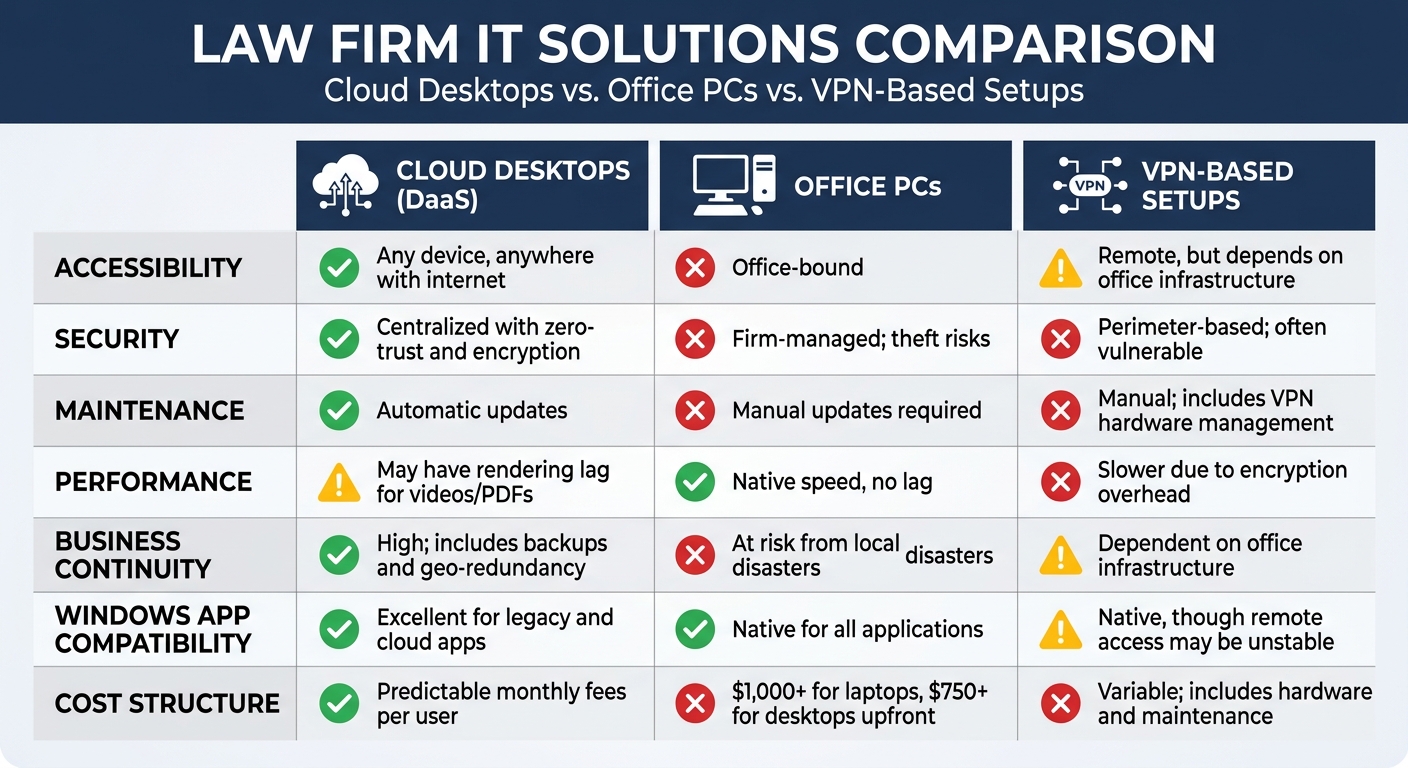
Cloud Desktops vs. Office PCs vs. VPN Setups
Cloud Desktops vs. Office PCs vs. VPN Setups for Law Firms
Understanding how cloud desktops stack up against traditional office PCs and VPN-based remote access is essential before deciding on a provider. Each option comes with its own strengths and weaknesses in terms of security, accessibility, maintenance, and performance.
When it comes to cost, the models diverge significantly. Office PCs come with steep upfront costs — typically $1,000 or more for laptops and $750 or more for desktops, not including monitors. Add ongoing IT support, and expenses can pile up quickly [1]. Cloud desktops, by contrast, offer predictable monthly fees per user, bundling infrastructure, security, and support into a single, transparent cost [2]. Choosing the right setup isn’t just about cost — it affects data security, productivity, and how well your firm can adapt to disruptions. This comparison provides a foundation for deciding which solution aligns best with your firm’s remote work requirements, whether you are an established practice or looking for virtual desktops for startups.
Which Law Firms Should Consider Cloud Desktops
Cloud desktops are especially useful for law firms dealing with remote work setups, older software requirements, rapid expansion, or limited IT resources.
For firms with remote or hybrid teams, cloud desktops provide secure, consistent access to a Windows environment. This eliminates the need for VPNs and reduces dependence on personal devices. Everyone can work from the same secure platform, no matter where they are.
If your practice relies on older legal software like PCLaw or Tabs3, cloud desktops are a great option. They allow these legacy applications to run in a centralized, fully supported Windows environment — without the hassle of maintaining physical servers in your office [2]. On the other hand, firms already using cloud-based tools like Clio or MyCase may not need this extra layer of virtual infrastructure. In fact, adding it could slow things down and increase costs — something IT consultants often refer to as the “virtual desktop tax” [2].
For rapidly growing firms or those without in-house IT, cloud desktops are a game-changer. New users can be set up in days instead of weeks, and maintenance responsibilities are handed off to the provider. For example, a 10-attorney firm charging $300 per hour could lose over $500,000 in annual billable hours if each lawyer wastes just 30 minutes a day dealing with tech issues [2].
Cloud desktops are not the right fit for every firm. If your firm doesn’t have reliable, high-speed internet, they won’t work effectively [3]. And if you’re only using browser-based software with no need for Windows applications, paying for a virtual desktop setup would be an unnecessary expense.
flexidesktop — Secure cloud desktops built for legal work
flexidesktop is designed to meet the specific needs of law firms, focusing on secure remote access, stable Windows environments, and reliable performance for legal tools. By centralizing client data on professionally managed servers instead of individual office PCs or personal laptops, it directly addresses the confidentiality standards set by ABA Model Rule 1.6[4].
To protect sensitive data, flexidesktop uses multi-factor authentication and HTTPS/TLS encryption. The infrastructure runs on enterprise-grade data centers (OVHcloud and Hetzner) with physical and network security, DDoS protection, and redundant connectivity. Considering that nearly 30% of law firms have faced security breaches, with the average cost of such incidents in professional services reaching $4.56 million [4], having your data off local hardware and in a managed data center is a meaningful step up from office PCs.
flexidesktop also ensures consistent performance for Windows-based legal software, removing the need for on-site servers [2]. Each plan includes dedicated resources like CPU, RAM, and storage, tailored for legal applications:
🔒 Infrastructure note: flexidesktop runs on OVHcloud and Hetzner data centers — enterprise-grade providers with locations across the US, Europe, and Asia-Pacific. Daily automated backups and simple administrative tools make it easier to manage user roles and permissions without dedicated IT staff.
Buyer Checklist: Questions to Ask Before Choosing a Provider
This checklist offers specific, actionable questions to evaluate a provider’s capabilities in security, performance, and pricing.
Security and Compliance
Does the provider use HTTPS/TLS encryption for protecting data both at rest and in transit? Is full-disk encryption with managed keys enforced? [4]
Is multi-factor authentication (MFA) mandatory for all users? [4]
Are role-based access controls in place, ensuring only authorized users can access sensitive case files? [4][2]
Does the system include session and activity tracking to monitor for unusual or suspicious logins? [4]
Does the provider disclose which data center infrastructure they use, and does that provider hold security certifications? (e.g., OVHcloud and Hetzner both publish their compliance certifications openly) [4]
Where is your firm’s data physically stored? Does the provider offer data residency options? Do you retain full ownership? [2]
Is there a written “Clean Exit” guarantee for data retrieval without excessive fees or delays? [2]
Can the provider share their Incident Response Plan (IRP)? How quickly will they notify you of suspected breaches? [4]
“The meaningful security difference is not which platform you use — it’s whether it’s properly configured for legal industry requirements.” — Matthew Kaing, Founder of eSudo Technology Solutions [2]
Performance and Reliability
Does the provider offer a Service Level Agreement (SLA) with a guaranteed uptime percentage (e.g., 99.9%)? What compensation is provided if this standard isn’t met? [4]
Are redundant data centers in place to ensure operations continue if one location goes offline? [5]
Are dedicated resources (CPU, RAM, storage) allocated to your firm, or shared with other tenants?
What are the provider’s backup policies? Are daily automated backups included? Can you restore individual files or entire desktops? [4][3]
How often are disaster recovery plans tested, and what is the typical recovery time after disruptions? [4]
Does the provider support server-based legal software like ProLaw, Time Matters, or Tabs3? [2][5]
Have you tested PDF rendering and video conferencing within the virtual environment to check for latency or input lag? [2]
Pricing and Support
Can the provider deliver a detailed cost breakdown, including setup fees, monthly rates, storage overages, and charges for adding users or software installations?
Are features like daily backups, VPN access, and technical support included in the pricing, or do they come with additional fees?
Is support offered 24/7, or is it limited to business hours? Which channels (phone, email, chat) are available?
What is the typical response time for critical issues affecting access to client data or legal applications?
Can you scale resources up or down as your firm’s needs change without penalties?
Does the provider explicitly exclude your firm’s data from being used in AI training sets? [4]
Frequently Asked Questions
What is a cloud desktop for law firms?
A cloud desktop for law firms is a full Windows environment hosted on a remote server, accessed via browser or Remote Desktop app. Unlike office PCs, all data lives in a secure data center — not on local hardware — which means attorneys can access case files, billing systems, and legal software (PCLaw, Tabs3, ProLaw) from any device, anywhere. If a laptop is stolen or fails, work continues without interruption.
Do cloud desktops comply with ABA confidentiality rules?
Yes, when properly configured. ABA Model Rule 1.6 requires lawyers to make “reasonable efforts” to prevent unauthorized access to client information. A cloud desktop provider with MFA, end-to-end encryption, Zero Trust architecture, and role-based access controls meets — and often exceeds — what a typical on-premises setup can offer. Always verify the provider’s specific security setup against your jurisdiction’s requirements before committing.
What legal software works with cloud desktops?
Server-based legal software like PCLaw, Tabs3, ProLaw, and Time Matters runs well on persistent Windows cloud desktops. Cloud-based tools like Clio and MyCase already run in a browser, so they don’t require a virtual desktop at all — adding one would be unnecessary cost. When evaluating a provider, ask them to confirm they’ve specifically tested the legal applications your firm relies on.
How much does a cloud desktop cost for a law firm?
Individual plans start at $29/month per desktop with flexidesktop (2 vCPU, 4 GB RAM, 60 GB SSD). Team plans supporting multiple users start at $89/month. Compare that to the cost of office hardware ($750–$1,000+ per machine) plus IT support, and cloud desktops often deliver a lower total cost of ownership — especially when you factor in avoided downtime and data recovery costs.
What’s the difference between a VPN and a cloud desktop for law firms?
A VPN tunnels traffic from your device to an office network — data still lives on office hardware, and if that hardware goes down, remote access is lost. A cloud desktop moves the entire work environment to a managed server. Your files and applications are in the data center, not the office. Performance is often better (no dependency on your office’s upload speed), and there’s no single point of failure tied to your physical location.
Are cloud desktops more secure than office PCs for law firms?
Generally, yes — when comparing a well-configured cloud desktop against a typical law firm’s office setup. Cloud desktops from reputable providers offer centralized patch management, automatic security updates, MFA, end-to-end encryption, and Zero Trust architecture by default. Office PCs rely on each machine being kept up to date and physically secured — gaps that are hard to close without dedicated IT staff. Nearly 30% of law firms have reported a breach; most stemmed from on-premise setups or poorly secured remote access.
Conclusion
Picking a secure cloud desktop provider is an essential decision for law firms. The right choice safeguards client confidentiality, ensures smooth access to Windows-based legal tools, and removes reliance on fragile office hardware. On the flip side, a poor choice can lead to data breaches, performance hiccups, or unplanned expenses that far outweigh the monthly subscription.
When evaluating options, prioritize security essentials like encryption, multi-factor authentication, and role-based access controls. Make sure the provider delivers dedicated Windows environments with consistent resources, avoiding shared setups that can falter during busy periods. Look for features like daily automated backups, disaster recovery plans, and clear policies that guarantee you retain full control of your data — including a straightforward exit strategy.
Considering that nearly 30% of law firms have faced data breaches — with recovery costs averaging $4.56 million — investing in solid infrastructure is a smart way to protect your firm [4]. To address these challenges, you need a solution that blends strong security with dependable performance. That’s where flexidesktop excels: dedicated CPU, RAM, and SSD storage from $19/month (Plan M at $39/month is recommended for attorneys doing real client work), transparent pricing, and full support for Windows-based legal software.
Israel de la Torre is the founder of flexidesktop and has spent 15+ years working in cloud infrastructure and Windows virtualization. He helps businesses migrate from on-premises Windows setups to managed cloud desktops.
Compare remote-access apps and cloud desktops to choose the right RDP alternative—use remote tools for occasional access or cloud PCs for always-on team work.
To provide the best experiences, we use technologies like cookies to store and/or access device information. Consenting to these technologies will allow us to process data such as browsing behavior or unique IDs on this site. Not consenting or withdrawing consent, may adversely affect certain features and functions.
Functional
Always active
The technical storage or access is strictly necessary for the legitimate purpose of enabling the use of a specific service explicitly requested by the subscriber or user, or for the sole purpose of carrying out the transmission of a communication over an electronic communications network.
Preferences
The technical storage or access is necessary for the legitimate purpose of storing preferences that are not requested by the subscriber or user.
Statistics
The technical storage or access that is used exclusively for statistical purposes.The technical storage or access that is used exclusively for anonymous statistical purposes. Without a subpoena, voluntary compliance on the part of your Internet Service Provider, or additional records from a third party, information stored or retrieved for this purpose alone cannot usually be used to identify you.
Marketing
The technical storage or access is required to create user profiles to send advertising, or to track the user on a website or across several websites for similar marketing purposes.
To provide the best experiences, we use technologies like cookies to store and/or access device information. Consenting to these technologies will allow us to process data such as browsing behavior or unique IDs on this site. Not consenting or withdrawing consent, may adversely affect certain features and functions.
Functional
Always active
The technical storage or access is strictly necessary for the legitimate purpose of enabling the use of a specific service explicitly requested by the subscriber or user, or for the sole purpose of carrying out the transmission of a communication over an electronic communications network.
Preferences
The technical storage or access is necessary for the legitimate purpose of storing preferences that are not requested by the subscriber or user.
Statistics
The technical storage or access that is used exclusively for statistical purposes.The technical storage or access that is used exclusively for anonymous statistical purposes. Without a subpoena, voluntary compliance on the part of your Internet Service Provider, or additional records from a third party, information stored or retrieved for this purpose alone cannot usually be used to identify you.
Marketing
The technical storage or access is required to create user profiles to send advertising, or to track the user on a website or across several websites for similar marketing purposes.